
Private Repo, PAT Auth, Git Identity, and First Push
I wanted to set up vaultname as an Obsidian vault that could sync through Git.
The goal was simple:
Use Obsidian as my second brain
→ store the vault in GitHub
→ let Hermes help structure, commit, and push updates safely
The actual journey was less simple.
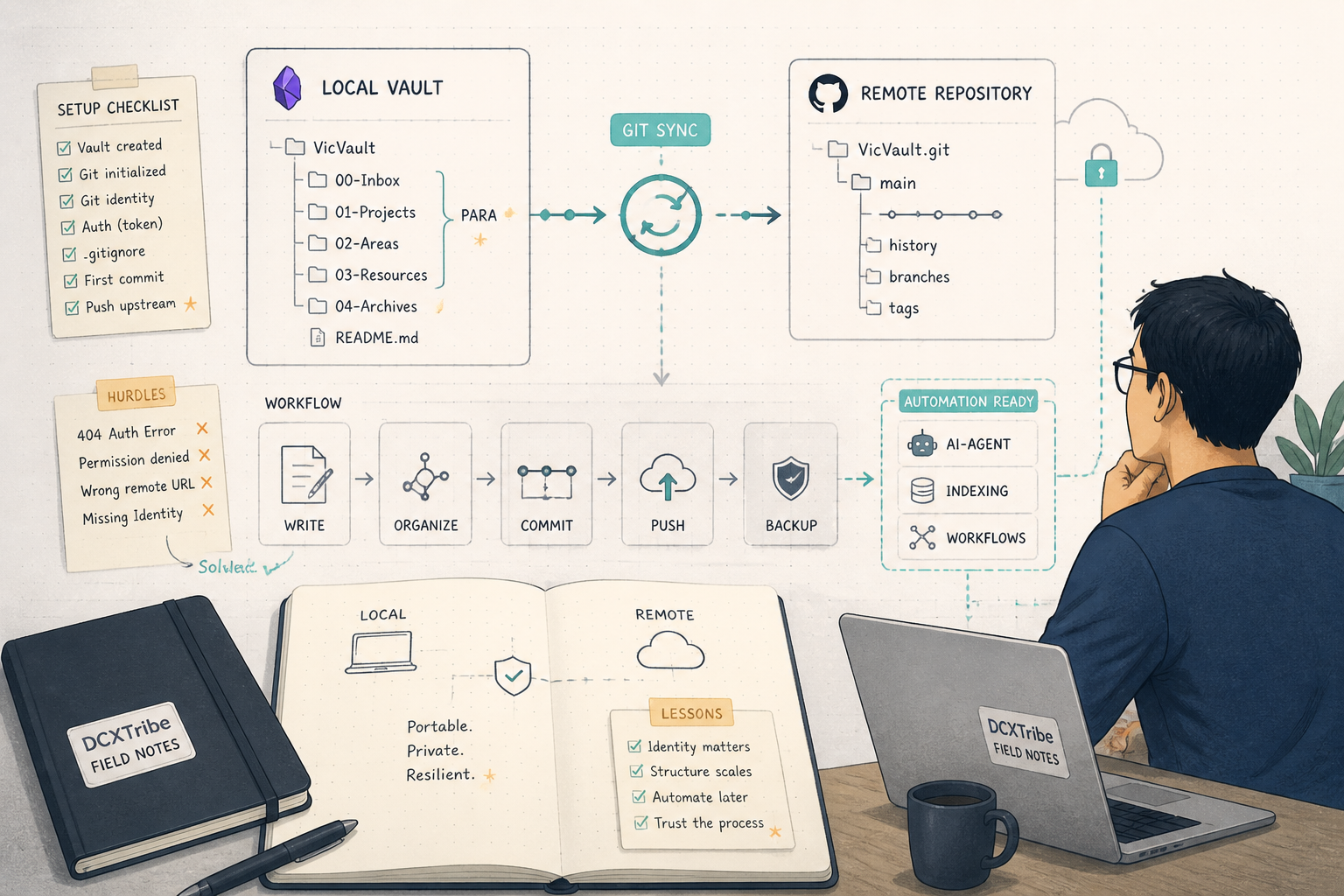
The repo looked like a 404 at first. The first clone failed because Git could not read credentials. GitHub CLI was missing. SSH was not configured. A GitHub personal access token was used. The clone finally worked. Hermes then built the Obsidian vault structure, but the first commit failed because Git identity was missing. The first push also failed because credential handling was not clean.
Eventually, the vault was pushed successfully.
This is the field note.
---
What I Was Trying to Do
I wanted an Obsidian vault to support four working domains:
personal productivity
vibe coding
business research
investment
The bigger idea was:
Obsidian
→ local vault
→ Git repo
→ GitHub remote
→ AI-agent workflows
Once the vault lives in Git, it becomes more than a folder of notes.
It becomes versioned, portable, recoverable, and easier for an AI agent to read, write, organize, and push safely.
That last word matters: safely.
Because when agents can act on files and repositories, guardrails matter.
---
Starting State
The session started with the GitHub repo URL:
https://github.com/ORG_OR_USER/vaultname.git
The first clone attempt failed:
git clone https://github.com/ORG_OR_USER/vaultname.git
Output:
Cloning into 'vaultname'...
fatal: could not read Username for 'https://github.com': No such device or address
That told me the repo was not accessible anonymously from the server environment.
Hermes then checked for GitHub CLI:
gh --version
Output:
gh: command not found
SSH was also not ready:
Host key verification failed.
So the starting state was:
GitHub repo URL: provided
HTTPS clone: failed
GitHub CLI: not installed
SSH: not configured
Repo visibility: appeared as 404 / inaccessible
At this point, the issue was not Obsidian.
The issue was GitHub authentication.
---
The First Learning: 404 Does Not Always Mean Missing
Hermes initially checked the repo and saw a 404.
That led to the early conclusion:
The repo may not exist.
The DCXTribe organization may not exist publicly.
That conclusion was understandable, but incomplete.
For private GitHub repositories, a 404 can also mean:
The repo exists, but the current environment is not authenticated.
So the better interpretation is:
404 may mean:
1. The repo does not exist
2. The repo exists but is private
3. The URL is wrong
4. The organization is private or inaccessible
5. Authentication is missing
This became the first useful lesson.
When working with GitHub automation, 404 is not always a content problem.
Sometimes it is an identity problem.
---
Authentication Used
A GitHub personal access token was used during the session.
I will not include the real token here.
In this article, I will refer to it as:
GITHUB_PAT=REDACTED
The session triggered a security warning because the token matched a known GitHub PAT pattern.
That warning was correct.
A GitHub personal access token should be treated like a password.
A safer future setup would be one of these:
Option 1: GitHub CLI login
Option 2: SSH key
Option 3: Git credential helper
Option 4: Environment variable with careful handling
The token-based clone worked, but the security lesson is clear:
Do not paste raw tokens into reusable commands, Markdown notes, screenshots, or public logs.
---
Clone Worked
After authentication, the repo cloned successfully.
Hermes inspected the folder and found that it was already an Obsidian vault.
The structure looked like this:
vaultname/
├── .obsidian/
│   └── plugins/
│       └── obsidian-git/
├── Welcome.md
├── 2026-05-31.md
└── .DS_Store
Git history showed one existing commit:
b0bc10d vault backup: 2026-05-31 13:02:36
Branches showed:
* main
  remotes/origin/HEAD -> origin/main
  remotes/origin/main
So the repo was not empty.
It was a fresh Obsidian vault with the obsidian-git plugin already present.
The starting vault had:
Welcome.md
daily note
Obsidian config
obsidian-git plugin
one existing commit
That meant the sync foundation existed.
The missing part was structure.
---
Vault Purpose Defined
I then defined what I wanted vaultname to support:
personal productivity
vibe coding
business research
investment
That gave Hermes enough direction to build the first structure.
The design pattern was PARA-inspired:
Projects
Areas
Resources
Archive
But it was customized for my actual working domains.
The new top-level structure became:
vaultname/
├── Home.md
├── Projects.md
├── Investments.md
├── Business Research.md
├── Vibe Coding.md
│
├── 00 - Inbox/
├── 01 - Daily/
├── 02 - Projects/
├── 03 - Areas/
├── 04 - Resources/
├── 05 - Archive/
├── Templates/
└── Assets/
This was the moment the vault became more than a blank Obsidian folder.
It became a working system.
---
Project Folders Created
The project folders were created around my active personal brands and workstreams:
02 - Projects/
├── DCXTribe/
├── VOJ/
├── VOL/
├── WK/
└── Personal/
The logic was simple:
DCXTribe  → CX, resilience, AI experiments, field notes
VOJ       → VictorOnJourney blog and personal growth content
VOL       → VictorOnLofi music projects
WK        → WisdomKita tutorials and learning content
Personal  → personal projects and life admin
This is where Obsidian becomes useful.
Each project folder can hold:
briefs
drafts
meeting notes
research
assets
templates
decision logs
project dashboards
The folder is not the project.
It is the project’s memory.
---
Resource Folders Created
The resources layer was created for reusable knowledge:
04 - Resources/
├── AI & Vibe Coding/
├── Business Research/
├── Investment/
├── Bazi & Qimen/
└── Content Creation/
This separates active work from reference material.
That matters because project folders can become messy when every note is treated like a project note.
A better distinction is:
Projects = things I am actively moving
Resources = knowledge I may reuse
Areas = ongoing responsibilities
Archive = inactive or completed
---
Templates Created
Hermes also created templates to avoid starting from a blank page.
The templates included:
Daily Note
Project
Meeting
Investment Research
Business Research
Vibe Coding Session
This matters because structure alone is not enough.
Templates create repeatability.
They help every new note start with a useful shape.
For example:
Investment Research → thesis, risks, catalysts, watchlist
Business Research   → market, customer, competitor, insight
Vibe Coding Session → goal, stack, prompt, issue, fix, next step
This turns the vault into a working environment, not just a filing cabinet.
---
Obsidian Settings Configured
Hermes also configured Obsidian settings:
daily notes → 01 - Daily/
attachments → Assets/
templates → Templates/
obsidian-git plugin active
The final user instruction was:
Open it in Obsidian:
Open folder as vault → /opt/data/vaultname
That confirmed the intended local vault path.
---
Failure: Git Author Identity Unknown
After the folder structure and templates were created, Hermes tried to commit the changes.
The first commit failed:
Author identity unknown

*** Please tell me who you are.

Run:

git config --global user.email "you@example.com"
git config --global user.name "Your Name"

fatal: unable to auto-detect email address
This is common in fresh containers and servers.
Git can track files, but it cannot create a commit until it knows the author identity.
The fix is either global:
git config --global user.name "Your Name"
git config --global user.email "you@example.com"
or repo-local:
git config user.name "Your Name"
git config user.email "you@example.com"
For AI-agent-managed repos, I prefer repo-local when possible.
It keeps the identity scoped to that repository.
After Git identity was configured, the commit succeeded.
The commit was:
9625c51 Initialize vaultname — PARA structure, templates, and dashboards
The commit summary showed:
36 files changed
588 insertions
229 deletions
That confirmed the local Git layer was working.
---
Failure: Push With Token in URL Did Not Work Cleanly
After the commit, Hermes tried to push.
The first push failed:
fatal: could not read Password for 'https://REDACTED@github.com': No such device or address
This failure matters.
It means the token existed, but the credential flow was still not clean in a non-interactive environment.
Common causes include:
token embedded incorrectly in remote URL
no interactive password prompt available
credential helper not configured
shell escaping issues
security tooling masking or blocking token
container environment has no TTY
The workaround succeeded through a programmatic push route.
The final push output was:
To https://github.com/ORG_OR_USER/vaultname.git
   b0bc10d..9625c51  main -> main
exit_code: 0
That confirmed the remote GitHub sync worked.
---
Final Working State
The final Git log showed:
9625c51 Initialize vaultname — PARA structure, templates, and dashboards
b0bc10d vault backup: 2026-05-31 13:02:36
The final vaultname structure looked like this:
vaultname/
├── Home.md                  ← Main dashboard
├── Projects.md              ← Projects MOC
├── Investments.md           ← Investment tracker
├── Business Research.md     ← Business research hub
├── Vibe Coding.md           ← Vibe coding sessions
│
├── 00 - Inbox/              ← Quick capture
├── 01 - Daily/              ← Daily notes
│
├── 02 - Projects/
│   ├── DCXTribe/
│   ├── VOJ/
│   ├── VOL/
│   ├── WK/
│   └── Personal/
│
├── 03 - Areas/
│   ├── Career/
│   ├── Finance/
│   ├── Health/
│   └── Home/
│
├── 04 - Resources/
│   ├── AI & Vibe Coding/
│   ├── Business Research/
│   ├── Investment/
│   ├── Bazi & Qimen/
│   └── Content Creation/
│
├── 05 - Archive/
├── Templates/
└── Assets/
The vault was now:
structured
committed
pushed
ready to open in Obsidian
connected to GitHub
prepared for future AI-agent writing workflows
---
Working Chain
The final working chain was:
GitHub private repo
→ PAT-authenticated clone
→ local vaultname folder
→ Obsidian vault structure created
→ templates and dashboards added
→ Git identity configured
→ commit created
→ token-authenticated push
→ GitHub remote updated
In shorter form:
GitHub
→ vaultname
→ Obsidian
→ Git commit
→ GitHub sync
The key lesson is that Obsidian Git sync is not only about the plugin.
The operational sync required:
repo access
credentials
local clone
vault structure
Git identity
commit
push
remote verification
---
Commands That Mattered
Clone the repo
git clone https://github.com/ORG_OR_USER/vaultname.git
If this fails with username or password errors, check authentication.
---
Check GitHub CLI
gh --version
If missing:
gh: command not found
Then use HTTPS token, SSH, or install GitHub CLI.
---
Check branches
git branch -a
Expected:
* main
  remotes/origin/HEAD -> origin/main
  remotes/origin/main
---
Check Git log
git log --oneline
Useful before making changes.
---
Check Git status
git status
This is essential before committing AI-generated changes.
---
Configure Git identity
Repo-local:
git config user.name "Your Name"
git config user.email "you@example.com"
Global:
git config --global user.name "Your Name"
git config --global user.email "you@example.com"
---
Commit changes
git add .
git commit -m "Initialize vaultname — PARA structure, templates, and dashboards"
---
Push changes
git push origin main
If using a token, avoid putting the raw token directly into a command or note.
---
Troubleshooting Checklist
If I repeat this setup, this is the checklist I would use:
[ ] Does the GitHub repo exist?
[ ] Is it public or private?
[ ] If it returns 404, could it be an auth issue?
[ ] Is GitHub CLI installed?
[ ] Is SSH configured?
[ ] If using HTTPS, is authentication available?
[ ] Is the PAT still valid?
[ ] Has the PAT been exposed and should it be rotated?
[ ] Did the clone succeed?
[ ] Is this actually an Obsidian vault?
[ ] Is .obsidian present?
[ ] Is obsidian-git installed?
[ ] Is the branch correct?
[ ] Did I check git status before changes?
[ ] Did the AI agent create or delete anything unexpected?
[ ] Is Git author identity configured?
[ ] Did the commit succeed?
[ ] Did the push succeed?
[ ] Did I verify the remote Git log?
[ ] Did I avoid destructive operations?
---
Security Notes
A GitHub personal access token was pasted directly into the session.
That should be treated as exposed.
The safe action is:
1. Revoke or rotate the token.
2. Create a new token with minimum required scope.
3. Store it in a safer place.
4. Avoid embedding it in command history or logs.
For future setup, I would prefer one of these options.
Option 1: GitHub CLI
gh auth login
Option 2: SSH Key
ssh-keygen -t ed25519 -C "your-email@example.com"
Then use an SSH remote:
git@github.com:ORG_OR_USER/vaultname.git
Option 3: Credential Helper
Use Git credential storage appropriate to the machine.
Option 4: Environment Variable
export GITHUB_TOKEN="REDACTED"
Minimum standard:
Do not publish tokens.
Do not store tokens in Markdown notes.
Do not commit tokens.
Do not leave tokens in shell history.
Rotate tokens if exposed.
---
Safety Rule Added
After the vault was pushed, I added a hard rule:
Do not delete any Git repository without asking me three times,
asking me to rethink,
and explaining what will be lost.
The saved rule became:
Three-strike repo deletion protocol:

1. Ask — explain exactly what is being lost
2. Ask again — explicitly request reconsideration
3. Final ask — require explicit confirmation
This rule matters because AI agents can move fast.
And Git repositories are durable memory.
Deleting one should never be casual.
---
Lessons Learned
1. GitHub 404 May Mean Private, Not Missing
The repo looked unavailable at first.
But after authentication, the clone worked.
For private repos, always check access before assuming the repo does not exist.
---
2. GitHub CLI Would Have Made This Cleaner
Without gh, the workflow depended on manual token handling.
That worked, but it was less clean and less safe.
A cleaner setup would be:
gh auth login
or SSH.
---
3. Tokens Should Not Be Pasted Into Live Logs
A PAT is a password.
If it appears in a chat, terminal log, script, or draft article, it should be rotated.
The agent can help use credentials, but credential hygiene must be deliberate.
---
4. Obsidian Git Sync Is More Than the Plugin
The obsidian-git plugin was already present.
But the full sync workflow still required:
clone
identity
commit
push
remote verification
Plugin presence alone does not prove end-to-end sync.
---
5. Git Identity Is Easy to Miss in Containers
Fresh containers often do not have:
user.name
user.email
configured.
The first commit failed for exactly that reason.
This should be checked early.
---
6. Always Inspect Git Status Before Committing AI-Generated Changes
Hermes created many folders and files quickly.
That was useful.
But before committing, git status is the control point.
It shows what changed before those changes become history.
---
7. Add Deletion Guardrails Before the Agent Gets Too Powerful
After previous destructive experiences, the three-strike repo deletion protocol is necessary.
Agents are useful because they act.
But action needs boundaries.
Especially around repositories.
---
Final Reflection
This setup looked like an Obsidian task.
It was actually a Git operations task.
The key layers were:
GitHub authentication
repository access
local clone
Obsidian vault structure
Git author identity
commit creation
push authentication
remote verification
agent safety rules
That is why field notes matter.
A polished guide might say:
Clone the repo, open it in Obsidian, enable Git sync.
But the real journey was:
Clone failed
Repo looked like 404
GitHub CLI missing
SSH not ready
Token used
Clone worked
Vault inspected
Structure created
Commit failed
Git identity fixed
Push failed
Token handling adjusted
Push worked
Deletion guardrail added
That is the more useful version.
Because that is what actually happened.
All views are my own. This field note is shared for learning and experimentation.