
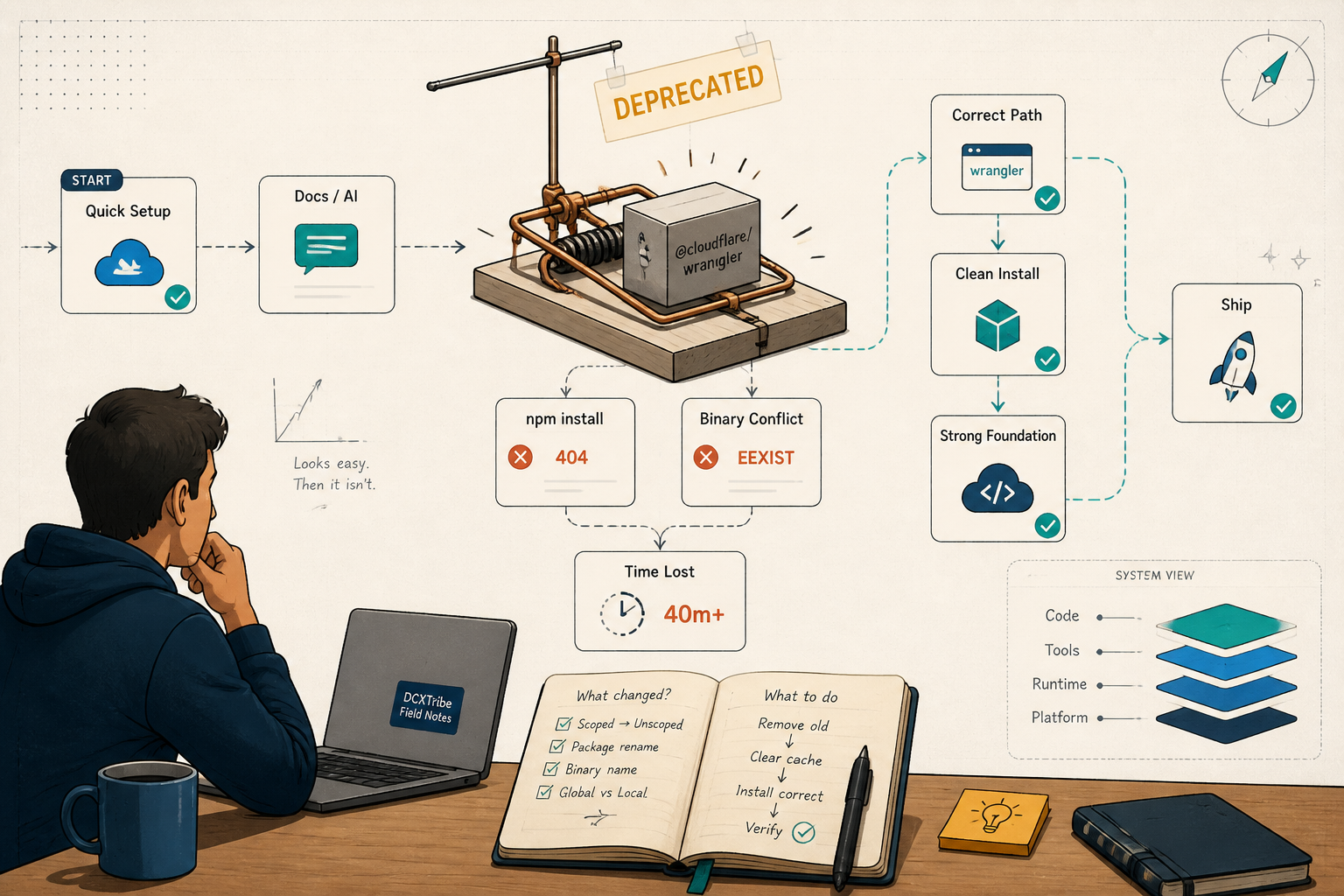
One wrong package name. Three errors stacked on top of each other. Forty minutes that should have been five. The install command looked right — it wasn't.
This is the field note.
---
What I Was Trying to Do
Set up Wrangler on my Mac so I could deploy Cloudflare Workers from the terminal. Simple goal. The kind that feels like it should take five minutes.
Me → terminal → wrangler deploy → Cloudflare Workers
The setup is where the time actually goes.
---
Starting State
node + npm:         installed
cloudflare account: ready
wrangler:           not installed (or so I thought)
That last line turned out to be wrong, and that's where the trouble started.
---
What Actually Happened
Turning Point 1: I installed a dead package
There are two Wrangler packages floating around the internet, and the older guides still point at the wrong one:
npm i -g @cloudflare/wrangler # WRONG — this is Wrangler v1
@cloudflare/wrangler is Wrangler v1. It's deprecated and archived. The modern package is just wrangler (unscoped). But the failure didn't say "wrong package" — it said this:
npm warn deprecated @cloudflare/wrangler@1.21.0: This package is for Wrangler v1.x
and is no longer supported.
npm error Error fetching release: Request failed with status code 404
npm error Downloading release from
https://workers.cloudflare.com/get-npm-wrangler-binary/1.21.0/x86_64-apple-darwin
That URL was the useful clue. The postinstall script for v1 tries to download a binary from Cloudflare's servers — and Cloudflare stopped hosting the v1 binary. The package didn't fail because my machine was broken. It failed because the thing it wanted no longer exists.
The real problem was not the 404. It was the package name.
Fix
Remove the dead v1 package, install the real one:
npm uninstall -g @cloudflare/wrangler
npm install -g wrangler
Turning Point 2: EEXIST — the file that wouldn't move
The clean install should have worked. Instead:
npm error code EEXIST
npm error path /Users/victorcheong/.local/bin/wrangler
npm error EEXIST: file already exists
npm error File exists: /Users/victorcheong/.local/bin/wrangler
This one is quieter than it looks. A leftover wrangler binary was sitting in ~/.local/bin — most likely a stale executable from the half-broken v1 attempt. npm won't overwrite a file it didn't cleanly place itself, so it stops rather than "overwrite recklessly" (npm's own words).
That directory is increasingly contested terrain, by the way. It's where Claude Code's native installer drops its binary too, and any number of newer dev CLIs land there. So a stale file from a botched install isn't a one-time hazard — it's a recurring class of problem.
Fix
Remove the stale file by hand, then reinstall:
rm ~/.local/bin/wrangler
npm uninstall -g @cloudflare/wrangler   # confirm v1 is fully gone
npm install -g wrangler
Verification
wrangler --version
⛅️ wrangler 4.101.0
That 4.x line is the signal it worked. Anything starting with 1. means you're still on the dead version.
---
Commands That Mattered
# The whole fix, in order:
rm ~/.local/bin/wrangler                # clear the stale binary
npm uninstall -g @cloudflare/wrangler   # remove deprecated v1
npm install -g wrangler                 # install modern Wrangler v4
wrangler --version                      # verify: expect 4.x, not 1.x
wrangler login                          # authorize against Cloudflare
wrangler whoami                         # confirm the account link
---
Working Chain
npm install -g wrangler → wrangler login → wrangler whoami → wrangler deploy
---
Troubleshooting Checklist
If your Wrangler install fails on macOS, walk these in order:
[ ] Did you install `wrangler`, NOT `@cloudflare/wrangler`?
[ ] Does `wrangler --version` show 4.x? (1.x = deprecated v1)
[ ] EEXIST error? Remove the stale file at ~/.local/bin/wrangler, then reinstall
[ ] Still EEXIST after rm? Run `ls -l ~/.local/bin/wrangler` — another tool may be recreating it
[ ] 404 on a binary download? You're on v1. Uninstall and switch packages
[ ] `wrangler whoami` shows your account after login?
---
What I Learned
1. Read the URL the failure was hitting
The error said "404," but the fix had nothing to do with networking. The URL in the error message (.../get-npm-wrangler-binary/1.21.0/...) named the real culprit: version 1.21.0. When an install fails, the URL it's trying to fetch is often where the problem is sitting, in plain text. Read it before you reach for anything else. Layer by layer.
2. Two package names exist for the same tool, and one is a trap
@cloudflare/wrangler (scoped, old) versus wrangler (unscoped, current). Old blog posts and AI answers still suggest the scoped one. Any time you install a CLI that 404s on its postinstall, check the package name before you check your machine.
3. EEXIST means "clean up the past," not "force the future"
It's tempting to reach for --force. Don't. EEXIST is npm telling you a previous install left something behind. Remove the specific file it names, then reinstall clean. Forcing it just buries the inconsistency, and you'll meet it again the next time something touches that path.
---
Try This Next
Run this one check before you install any Cloudflare tooling today:
npm ls -g --depth=0 | grep wrangler
If you see @cloudflare/wrangler in the output, you're holding the deprecated version. Uninstall it, install wrangler, and confirm you land on 4.x. Better to catch it now than mid-deploy.
---
*All views are my own. This field note is shared for learning and experimentation.*