
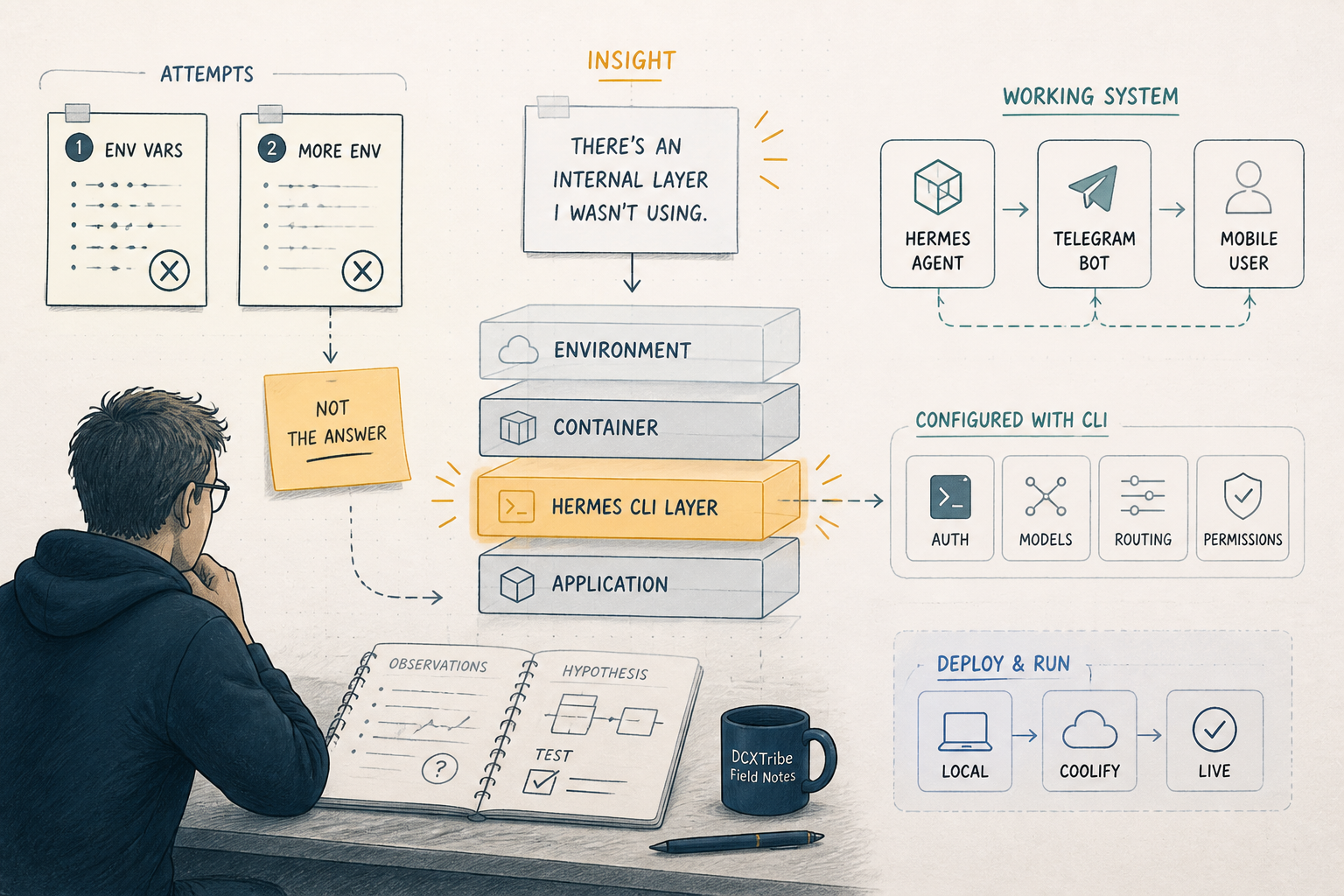
In my first two posts, I wrote honestly about not getting Hermes fully working.
ILMU failed.
OpenRouter + DeepSeek partially worked.
I had Hermes installed, the health check responding, /v1/models returning hermes-agent — and yet the actual agent chat would not route to my chosen backend.
I ended Post 2 with a layered troubleshooting framework and a clean separation:
OpenClaw → ILMU
Hermes → OpenRouter (still being debugged)
That was the honest state.
What I did not know at the time was that I was debugging the wrong layer entirely.
This post is about how I finally got Hermes working end-to-end — first as a working agent chat in the terminal, then as a Telegram bot on my phone — and the single misconception that had blocked me the whole time.
---
Where I Got Unstuck
I gave Claude both of my earlier blog posts and asked it to review my attempt.
I expected feedback like:
Try this environment variable.
Check that header.
Restart with a fresh volume.
Instead, Claude searched the actual Hermes Agent documentation, fetched the configuration reference page, and came back with something I did not expect:
The entire environment: block in your Coolify compose is being ignored by Hermes' model router.
That sentence reframed everything.
It meant my two failed attempts were not really two different bugs.
They were the same bug, expressed differently.
---
The Misconception
I had assumed Hermes was a normal Docker container that reads its configuration from environment variables — like most modern apps.
So I built compose files with stacks of env vars:
HERMES_INFERENCE_PROVIDER
HERMES_INFERENCE_MODEL
HERMES_MODEL
API_SERVER_MODEL_NAME
OPENAI_API_KEY
OPENAI_BASE_URL
OPENROUTER_API_KEY
These looked plausible.
They are not real Hermes config keys.
Hermes Agent reads its real configuration from two files inside ~/.hermes/ — which in the container maps to the /opt/data volume:
config.yaml   # model, provider, base_url, terminal backend, everything else
.env          # secrets: API keys, bot tokens, passwords
The resolution order is:
1. CLI arguments
2. config.yaml
3. .env (fallback for env vars / secrets)
4. Built-in defaults
My compose env vars were not in any of those layers.
So Hermes started, exposed its OpenAI-compatible API server on port 8642, passed every health check — all while running on default model routing, not the routing I thought I had configured.
That single fact explained both of my earlier failures.
---
Why This Caused Both Errors
ILMU — "Missing Authentication header"
When Hermes called the upstream, it did not have my ILMU key wired in, because the key was sitting in an environment variable that Hermes does not read for that purpose.
The key being present in the container was irrelevant.
If Hermes does not know the name of the variable, the key may as well not exist.
So ILMU received a request with no authentication header.
The error was honest.
OpenRouter — "No endpoints available matching your guardrail restrictions and data policy"
This one was more subtle.
The error came from OpenRouter, not from Hermes — meaning my account had authenticated, so the OpenRouter API key did get through (it is a recognized secret name).
But because HERMES_MODEL is not a real config key, Hermes was not requesting deepseek/deepseek-v4-flash.
It was requesting its built-in default model.
Under my OpenRouter privacy policy, that default model had no available endpoints.
So OpenRouter rejected the request with the policy error.
Same root cause, different symptoms.
Direct curl with the right model worked.
Hermes with the wrong-default model failed.
I had spent days chasing the wrong layer.
---
The Fix (What I Should Have Done From Day One)
Once I understood the real configuration mechanism, the fix was short.
Step 1 — Strip the compose
I deleted the entire environment: block.
The minimal Coolify compose looks like this:
services:
  hermes:
    image: 'nousresearch/hermes-agent:latest'
    restart: unless-stopped
    command: [gateway, run]
    ports:
      - '8642:8642'
    volumes:
      - 'hermes_data:/opt/data'
volumes:
  hermes_data:
That is the whole file.
No env soup.
No invented variable names.
Step 2 — Open the Coolify terminal into the container
Coolify has a Terminal tab on each running application.
Clicking it gives me a shell inside the Hermes container.
From there I can run Hermes' own CLI commands directly — no docker exec, no container-name juggling.
Step 3 — Use the interactive model picker
hermes model
This opens a menu.
I selected:
Provider: OpenRouter
API key: sk-or-...
Model:   deepseek/deepseek-v4-flash
The picker writes the right keys to config.yaml and the right secret to .env.
No guessing.
The interactive pickers exist because the YAML keys are not always intuitive. Use them. Stop hand-editing files until you know what you are doing.
Step 4 — Verify what Hermes will actually use
hermes config
This was the command I never knew to run.
It prints the resolved configuration — what Hermes will actually use when it makes a request.
For weeks I had been guessing what was loaded.
This single command ends the guessing.
It should be the first thing anyone runs when debugging Hermes.
Step 5 — Restart from Coolify
Clicked Restart in Coolify.
Waited for the green dot.
Step 6 — Test inside the container
hermes chat
I typed:
Say hello in one sentence.
The reply came back:
Hello! I'm Hermes, ready to help.
That was the moment.
After two posts of partial success, the chain was finally green:
me → Hermes → OpenRouter → DeepSeek V4 Flash → back to me
End to end.
In the terminal.
Working.
---
From Terminal to Phone — Adding Telegram
Working in the terminal is fine for testing.
But I wanted to use Hermes from my phone — while in the car, in meetings, in the evening.
Hermes Agent has built-in support for over 20 messaging platforms.
Telegram is the easiest to set up.
The total time from "I have Hermes in the terminal" to "I have Hermes in my pocket" was under ten minutes.
Creating the bot
On my phone in Telegram:
1. Search @BotFather (the official one, blue checkmark)
2. Send /newbot
3. Give it a name and a username ending in "bot"
4. Copy the bot token
Getting my user ID
Hermes uses your numeric Telegram user ID — not your @username — to authorize you.
1. Search @userinfobot in Telegram
2. It immediately replies with my numeric ID
3. Copy it
Configuring Hermes
Back in the Coolify terminal:
hermes gateway setup
Walked through the wizard:
Platform:      Telegram
Bot token:     <pasted>
User ID:       <pasted>
Home channel:  yes, use my user ID
The "home channel" question threw me at first.
It means: where does Hermes send messages it generates on its own — scheduled task output, cron job results, proactive reminders.
For a personal single-user setup, the home channel is your DM with the bot.
I said yes.
Restart and test
Restart in Coolify.
Opened Telegram, found my bot, hit Start, sent:
Hello, can you hear me?
The reply came back within seconds.
I now have an AI agent running on a Coolify server in Cyberjaya, reachable from anywhere in the world, via Telegram on my phone.
That changes how I will work.
---
What I Did Wrong vs What Actually Worked
What I did wrong:
Assumed env vars would configure Hermes
Invented config key names that looked plausible
Debugged the API key layer when the problem was the config-loading layer
Tested the whole chain at once instead of layer by layer
Never ran hermes config to see what was actually loaded
What actually worked:
Stripped the compose to its minimum
Opened the container terminal via Coolify
Used hermes model to set provider + model interactively
Used hermes config to verify what was loaded
Restarted cleanly from Coolify
Tested with hermes chat inside the container first
Added Telegram via hermes gateway setup
The difference between the two lists is not technical skill.
It is knowing where the tool actually reads its configuration from.
---
The Bigger Learning
I had been treating Hermes like a typical OpenAI-compatible proxy:
Set env vars → it routes to upstream → done.
That mental model was wrong.
Hermes is an agent framework, not a proxy.
It has its own configuration system, its own CLI, its own interactive setup commands, and its own opinions about where state lives.
The lesson is bigger than Hermes:
Before debugging a tool, find out where it actually reads its configuration from. Not where it probably reads from. Not where similar tools read from. Where this tool reads from — in its own documentation.
If I had run hermes config on day one, I would have saved myself two weeks.
If I had read the configuration reference page on day one, I would have saved myself two failed blog posts.
But honestly — the two failed blog posts were not wasted.
They forced me to articulate what I thought was happening, which is what let Claude diagnose what was actually happening.
Writing about the problem is part of solving the problem.
That is not just an AI-collaboration insight.
It is true with humans too.
It is true alone with a notebook.
---
What This Unlocks
Now that the foundation works, several things become easy:
Add ILMU as a second provider — it is just a second entry in config.yaml
Add more skills — Hermes has a skill_manage tool built in
Add scheduled tasks — Hermes has native cron support
Add WhatsApp or Discord — same gateway, different platform
Connect Open WebUI for a web chat UI
Hand Hermes my Google Drive, Calendar, or other MCPs
Each of those would have been impossible while the foundation was broken.
Each is now within reach.
That is the real value of finally getting Hermes working — not the chat itself, but the platform underneath it.
---
On Working with AI as a Debugging Partner
A short note on the meta-level.
I have been using Claude across many projects — strategy, product, content, code.
This is the first time I have used it for hard infrastructure debugging.
What worked:
I gave it the full context — both of my failed blog posts
It searched the live documentation, not just its training data
It did not just answer my question — it reframed the question
It pointed at the layer I was not looking at
It gave me commands I could run to verify, not just to try
The key move was the reframe:
The entire environment: block is being ignored.
Once that landed, the path forward was obvious.
I would not have seen it alone.
Not because I am not technical enough.
But because when you have been staring at a problem for two weeks, you stop seeing the assumptions baked into your own setup.
A good debugging partner — human or AI — finds the assumption you are not questioning.
---
Final Reflection
This is the third post in a series that started with "I tried something and it did not work."
Post 1: ILMU + Hermes — failed.
Post 2: OpenRouter + Hermes — partial.
Post 3: Hermes — working, on my phone, with a layered foundation I can build on.
The honest arc of the series is not "I am a master of AI infrastructure."
The honest arc is:
I tried something I did not fully understand. It failed in informative ways. I documented the failures. Someone (Claude, in this case) saw what I could not see. I tried again with the correct mental model. It worked. Now I am building on it.
That is the cycle.
It will not be the last one.
If you are stuck on Hermes — or stuck on anything where you have been guessing for too long — the move is:
1. Write down what you think is happening
2. Show it to a fresh pair of eyes
3. Be ready for the reframe
4. Run the one verification command you have been avoiding
5. Restart from the correct layer
That sequence has worked for me twice this month.
I expect it will keep working.