
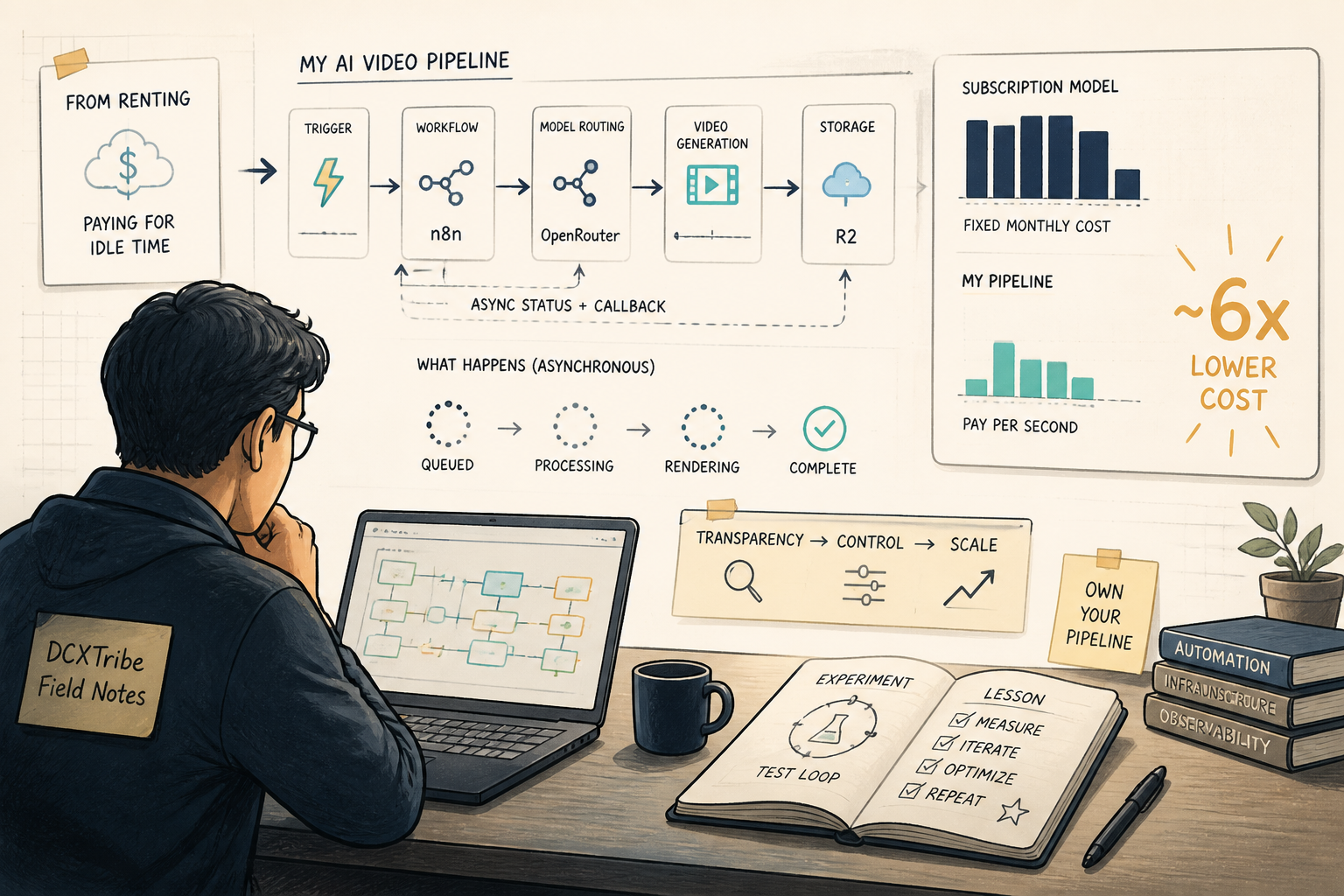
Three models. One pipeline. Real cost data.
I wanted to know something simple: could I generate AI videos through my own infrastructure, store them in my own cloud, and pay only for what I use — instead of subscribing to a platform that charges me whether I generate or not?
The answer is yes. And the cost difference is sharper than I expected.
---
The Challenge
I already use HiggsField for AI image and video generation. It works well. But it runs on a subscription-plus-credits model — you pay a monthly fee for access, then spend credits on top. In months where I generate heavily, the value is there. In quieter months, I'm burning a fixed cost for nothing.
I wanted the BytePlus model: build the infrastructure, run it for myself, prove it works, then offer the same proven stack to others. Not "another AI image tool" — the engine underneath.
The foundation was already partly built. I had a working n8n workflow that generates images via OpenRouter and uploads them to Cloudflare R2. The question was whether the same pattern could handle video — which is fundamentally harder. Video generation is async. You submit a job, wait minutes, poll for completion, download an MP4, then upload a larger file. More moving parts, more failure points.
---
The Stack
n8n (self-hosted)       → workflow orchestration, webhook triggers
OpenRouter              → unified API for multiple AI models
Cloudflare R2           → S3-compatible object storage (pennies per GB)
Supabase (planned)      → job logging, future web app backend
Claude MCP              → building and testing workflows directly from chat
---
What I Built
Two n8n workflows that handle the full video generation lifecycle.
Workflow 1: Video Submit
Accepts a prompt, model name, and generation parameters. Sends the request to OpenRouter's /api/v1/videos endpoint. Returns the job ID and polling URL. That's it — submit and get out.
Workflow 2: Video Poll + R2 Upload
Takes a job ID, polls OpenRouter for status. If still processing, exits with "not complete." If complete, downloads the MP4, generates an R2 storage key with a model-based naming convention, uploads via the S3 node, then generates a 24-hour presigned URL for viewing.
The two-workflow split is deliberate. Video generation takes 2-7 minutes depending on the model. You don't want a single long-running workflow blocking on a poll loop. Submit once, poll separately, poll again if needed.
---
The Build Process
The Image Workflow Was the Blueprint
I already had a working image generation workflow (OpenRouter to R2 Full) that proved the core pattern: call OpenRouter → get binary data → upload to R2 via the n8n S3 node → generate a presigned URL. The video workflow needed to follow the same authentication and upload pattern.
The First Mistake: Wrong Upload Method
The initial video workflow used a raw HTTP PUT request to R2. This doesn't work. R2 requires AWS Signature v4 authentication on every request, and a plain HTTP node can't sign requests properly.
The fix was obvious once I compared the two workflows side by side. The working image workflow uses n8n's built-in S3 node, which handles all the signing internally. Swapping the HTTP Request node for the S3 node — with the same credential — fixed it immediately.
That was the useful clue: when something works in one workflow, don't reinvent the approach in another. Copy the pattern exactly.
The Second Mistake: Lost Data Between Nodes
After the S3 upload succeeded, the presigned URL generator was producing URLs with undefined in the hostname and path. The S3 upload node replaces its input data with {success: true} — it doesn't pass through the original fields. So the R2 key I had carefully constructed in an upstream node was gone by the time the presigned URL generator needed it.
The fix: reference back to the specific upstream node using $('Prepare R2 Key').first().json.r2Key instead of $json.r2Key. In n8n, never assume data flows through — always reference the node that produced it.
The Third Catch: Environment Variables That Don't Exist
The presigned URL code was referencing process.env.R2_ACCOUNT_ID and process.env.R2_BUCKET_NAME. These environment variables weren't set on my n8n host. My working presigned URL generator workflow hardcodes the R2 endpoint and bucket name. Once I matched the approach — hardcoded values rather than env vars that don't exist — the URLs generated correctly.
The Privacy Wall
The first video submit attempt failed with a 404 and a cryptic message: "No endpoints available matching your guardrail restrictions and data policy." The workflow was fine. The issue was my OpenRouter account's privacy settings, which blocked certain video generation endpoints. A quick settings change at openrouter.ai/settings/privacy and the next attempt went through.
The Naming Problem
After generating a couple of videos, I had files in R2 with names like videos/ra79ktCIAOUAGBfC0Sjh/video-20260606162502.mp4. Completely unidentifiable. Which model made which video?
I updated the R2 key pattern to videos/{model}/{timestamp}-{job_id_short}.mp4. Now browsing R2 shows the model name in the path, and the short job ID keeps files traceable. Small change, real difference when you're managing dozens of outputs.
---
What Worked
1. The S3 node pattern from the image workflow transferred directly to video uploads
2. Two-workflow split (submit + poll) kept things clean and non-blocking
3. Polling approach is simpler and more reliable than webhook callbacks
4. Model-based R2 key naming made outputs immediately identifiable
5. Claude MCP → n8n integration let me build, test, and fix workflows without leaving the chat
---
What Didn't
1. Raw HTTP upload to R2 — doesn't handle S3 signing. Use the S3 node.
2. Assuming $json passes through the S3 node — it doesn't. Reference upstream nodes explicitly.
3. Relying on env vars that hadn't been set — match the pattern that already works.
4. Flat file naming without model context — useless for browsing at scale.
5. Video generation takes 2-7 minutes — manual polling is tedious. Background polling is the next improvement.
---
The Cost Data
This is the part that matters. Same prompt, same 5-second duration, three different models through OpenRouter:
Model               Duration    Cost        Cost/Second
─────────────────────────────────────────────────────────
Grok Imagine Video   5s         $0.35       $0.07/s
Seedance 2.0         5s         $0.75       $0.15/s
Google Veo 3.1       4s         $1.58       $0.40/s
Grok is roughly half the price of Seedance and nearly 6x cheaper than Veo per second. But cost isn't the whole picture — Veo typically produces more cinematic, higher-fidelity output. Grok is fast and cheap, good for drafts and iterations. Seedance sits in the middle.
The real comparison is against subscription platforms. With this pipeline, I pay $0.35–$1.58 per video, only when I generate. No monthly subscription. No idle cost. My R2 storage costs pennies. My n8n instance is already running. The only variable cost is the actual generation.
---
What I Learned
1. Copy the pattern that works — don't improvise
The image workflow had already solved R2 uploads, credential handling, and presigned URLs. Every deviation from that pattern in the video workflow caused a bug. The S3 node, the credential type, the presigned URL approach — all should have been copied exactly from the start.
2. Video is harder than images, but not as hard as the spec suggests
The BRD documents I wrote for this project positioned video as a major async challenge requiring webhook callbacks, signature verification, and complex retry logic. In practice, a simple submit-then-poll approach worked cleanly. The complexity was in the upload and URL generation — exactly the same problems I'd already solved for images.
3. Cost transparency changes your model selection
When you see that Veo costs 6x more than Grok for the same prompt, you start making intentional choices. Draft with Grok, finalize with Veo. That kind of model-aware budgeting is invisible on subscription platforms where everything is denominated in opaque "credits."
4. Infrastructure you own compounds in value
Every workflow I build, every pattern I prove, every cost data point I collect — it all stacks. The image workflow taught the video workflow. The video workflow will teach the web app. And the whole thing becomes a demonstrable, sellable asset. This is the BytePlus logic: build for yourself, document what you learn, offer the proven stack to others.
5. The boring middle is where the real setup happens
The exciting part was "I generated a video with AI!" The boring part was fixing presigned URLs, matching credential types, and updating file naming conventions. That boring part is what makes it a production system instead of a demo.
---
What's Next
1. Build background polling — a scheduled n8n workflow that checks all pending
   video jobs every 60 seconds, eliminating manual poll triggers
2. Create the generation_jobs table in Supabase to log every image and video
   job with model, cost, status, and R2 key
3. Build the Lovable web app — single-user, prompt composer, model picker
   (Seedance 2.0, GPT Image 2, Nano Banana), prompt optimization, job history
4. Add prompt optimization as a pre-generation step — model-specific system
   prompts that rewrite user prompts for better output quality
5. Document the full cost comparison as a standalone DCXTribe guide
---
Why This Matters
If you're paying $20–50/month for an AI generation platform and only using it in bursts, you're subsidizing other users' generations with your idle months. A self-hosted pipeline on n8n + OpenRouter + R2 costs nothing when you're not generating, and pennies when you are.
More importantly, you own the infrastructure. You choose the models. You see the real costs. And if you're a builder, consultant, or agency, that infrastructure becomes a sellable asset — not just a tool you rent.
Less hype, more proof. The videos are in R2. The costs are in the log. The workflows are running.
---
*All views are my own. This experiment note is shared for learning and experimentation.*