
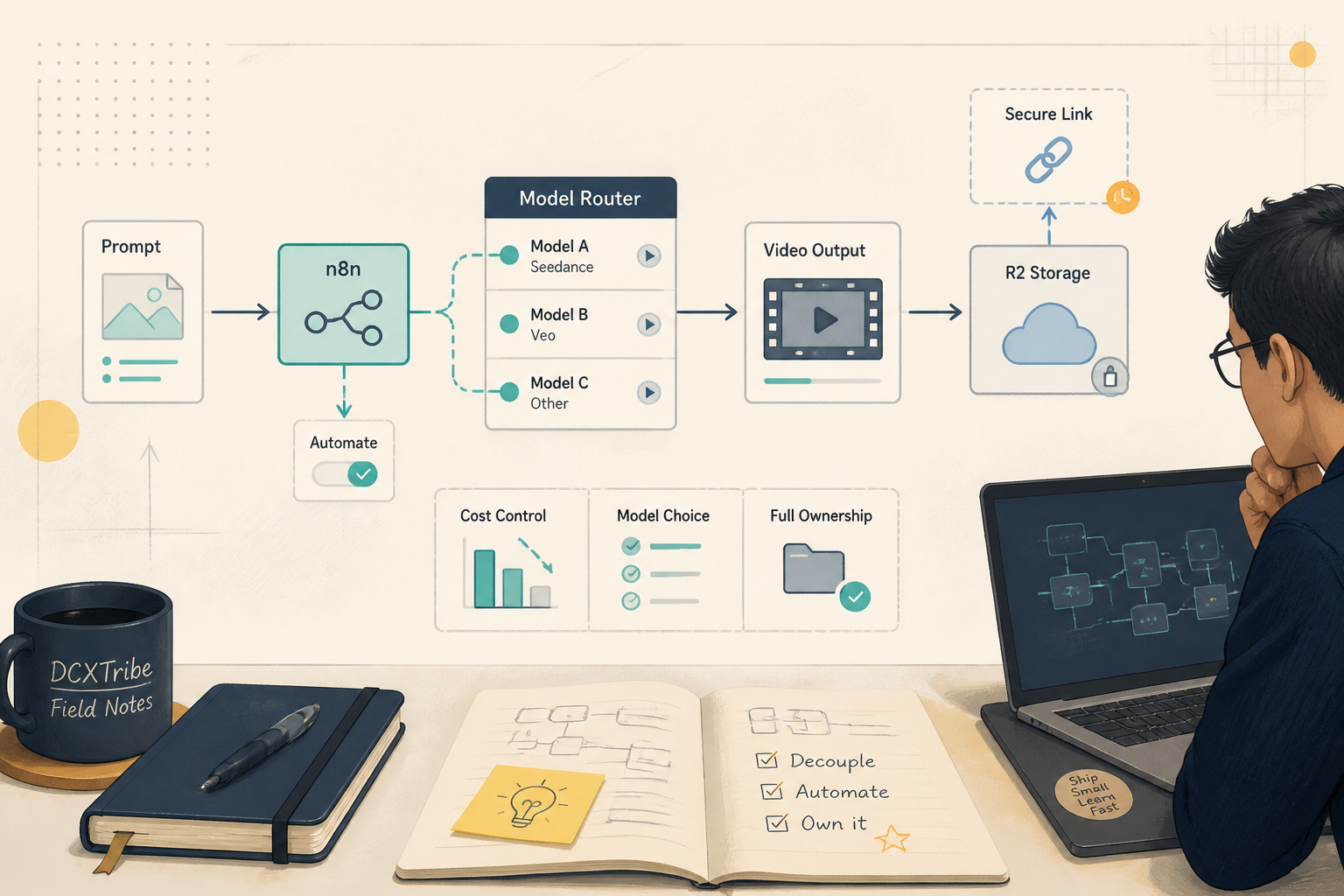
Generate AI videos from multiple models (Seedance 2.0, Grok, Veo), store them in your own cloud storage, and pay only when you generate — no subscriptions, no platform lock-in.
---
What You're Setting Up
You → n8n Webhook → OpenRouter API → AI Model (Seedance/Grok/Veo)
                                          ↓
                        MP4 video downloaded
                                          ↓
                        Cloudflare R2 upload (S3 node)
                                          ↓
                        Presigned URL (24hr access)
Two workflows handle the full lifecycle:
Workflow 1: Video Submit     → sends prompt to OpenRouter, returns job ID
Workflow 2: Video Poll + R2  → checks job status, downloads MP4, uploads to R2, generates URL
---
Before You Start
1. A running n8n instance (self-hosted or cloud)
2. An OpenRouter account with API key and credits loaded
3. A Cloudflare account with an R2 bucket created
4. R2 API credentials (Access Key ID + Secret Access Key)
5. The n8n S3 node credential configured for R2
---
Important: R2 Credentials
R2 uses S3-compatible authentication. You need two things configured in n8n:
S3 Credential — for uploading files. Create an S3 credential in n8n with:
Region:      auto
Endpoint:    https://{ACCOUNT_ID}.r2.cloudflarestorage.com
Access Key:  your R2 access key ID
Secret Key:  your R2 secret access key
OpenRouter Credential — for API calls. Create an HTTP Header Auth credential:
Header Name:  Authorization
Header Value: Bearer YOUR_OPENROUTER_API_KEY
Or use n8n's predefined openRouterApi credential type if available.
Your R2 Account ID is visible in the Cloudflare dashboard under R2 → Overview. It's the subdomain in your R2 endpoint URL.
---
Step 1: Create the Video Submit Workflow
This workflow accepts a prompt and sends it to OpenRouter for video generation.
Node 1: Manual Trigger (or Webhook)
Start with a Manual Trigger for testing. Switch to a Webhook trigger when you want external systems to call it.
Node 2: Video Config (Set node)
Configure the generation parameters:
{
  "prompt": "A cat walking across a sunny garden path",
  "model": "bytedance/seedance-2.0",
  "duration": 5,
  "resolution": "720p",
  "aspect_ratio": "9:16"
}
Available models through OpenRouter:
bytedance/seedance-2.0       → $0.75 / 5s video (mid-range quality/cost)
x-ai/grok-imagine-video      → $0.35 / 5s video (cheapest, good for drafts)
google/veo-3.1               → $1.58 / 4s video (highest quality, premium cost)
Node 3: Submit to OpenRouter (HTTP Request)
Method:  POST
URL:     https://openrouter.ai/api/v1/videos
Auth:    OpenRouter credential (Header Auth or openRouterApi)
Body:    JSON from the Video Config node
The response includes a provider_job_id and status. Save the job ID — you'll need it for polling.
You should see: A response with status: "pending" and a provider_job_id string.
---
Step 2: Create the Video Poll + R2 Upload Workflow
This workflow checks if the video is done, downloads it, and stores it in R2.
Node 1: Poll Config (Set node)
{
  "provider_job_id": "PASTE_JOB_ID_HERE",
  "model": "seedance-2.0"
}
The model field is used for the R2 file naming convention.
Node 2: Poll OpenRouter Status (HTTP Request)
Method:  GET
URL:     https://openrouter.ai/api/v1/videos/{{ $json.provider_job_id }}
Auth:    OpenRouter credential
Node 3: Check Status (IF node)
Branch on {{ $json.status === "completed" }}.
- True → continue to download
- False → exit with "Not Complete Yet" message
Node 4: Download MP4 (HTTP Request)
Method:  GET
URL:     {{ $json.output_url }}
Auth:    OpenRouter credential
Response: File (binary data)
Node 5: Prepare R2 Key (Set node)
Generate a descriptive file path:
// Expression for the r2Key field:
videos/{{ $json.model }}/{{ new Date().toISOString().replace(/[-:T]/g,'').slice(0,14) }}-{{ $json.provider_job_id.slice(0,8) }}.mp4
This produces paths like videos/seedance-2.0/20260606163648-ra79ktCI.mp4 — instantly identifiable by model, date, and job.
Node 6: Upload to R2 (S3 node)
This is critical. Use n8n's built-in S3 node, not an HTTP Request.
Operation:   Upload
Bucket Name: dcxtribe-generations (or your bucket name)
File Name:   {{ $('Prepare R2 Key').first().json.r2Key }}
Credential:  Your S3 credential (configured for R2)
Binary Data: from the Download MP4 node
Do not use an HTTP Request node for R2 uploads. R2 requires AWS Signature v4 authentication that only the S3 node handles correctly.
Node 7: Generate Presigned URL (Execute Command node)
This generates a time-limited URL for accessing the video without making the bucket public.
node -e "
const crypto = require('crypto');
const host = 'YOUR_ACCOUNT_ID.r2.cloudflarestorage.com';
const bucket = 'dcxtribe-generations';
const key = '$R2_KEY';
const region = 'auto';
const service = 's3';
const accessKey = process.env.R2_ACCESS_KEY_ID;
const secretKey = process.env.R2_SECRET_ACCESS_KEY;
const now = new Date();
const dateStamp = now.toISOString().replace(/[-:]/g,'').slice(0,8);
const amzDate = dateStamp + 'T' + now.toISOString().replace(/[-:]/g,'').slice(9,15) + 'Z';
const expires = 86400;
const credential = accessKey + '/' + dateStamp + '/' + region + '/' + service + '/aws4_request';
const canonicalQueryString = 'X-Amz-Algorithm=AWS4-HMAC-SHA256' +
  '&X-Amz-Credential=' + encodeURIComponent(credential) +
  '&X-Amz-Date=' + amzDate +
  '&X-Amz-Expires=' + expires +
  '&X-Amz-SignedHeaders=host';
const canonicalRequest = 'GET\n/' + bucket + '/' + key + '\n' + canonicalQueryString + '\nhost:' + host + '\n\nhost\nUNSIGNED-PAYLOAD';
const stringToSign = 'AWS4-HMAC-SHA256\n' + amzDate + '\n' + dateStamp + '/' + region + '/' + service + '/aws4_request\n' + crypto.createHash('sha256').update(canonicalRequest).digest('hex');
function hmac(key, data) { return crypto.createHmac('sha256', key).update(data).digest(); }
const signingKey = hmac(hmac(hmac(hmac('AWS4' + secretKey, dateStamp), region), service), 'aws4_request');
const signature = crypto.createHmac('sha256', signingKey).update(stringToSign).digest('hex');
const url = 'https://' + host + '/' + bucket + '/' + key + '?' + canonicalQueryString + '&X-Amz-Signature=' + signature;
console.log(JSON.stringify({presigned_url: url, expires_in: '24 hours'}));
"
Replace YOUR_ACCOUNT_ID with your actual R2 account ID. The env vars R2_ACCESS_KEY_ID and R2_SECRET_ACCESS_KEY must be set on the n8n host.
The Execute Command node can access process.env. The Code node sandbox cannot. This is an n8n platform constraint.Node 8: Final Result (Set node)
Assemble the output:
{
  "ok": true,
  "status": "completed",
  "media_type": "video",
  "r2_key": "videos/seedance-2.0/20260606163648-ra79ktCI.mp4",
  "presigned_url": "https://...",
  "expires_in": "24 hours"
}
---
Step 3: Test the Full Pipeline
1. Open Video Submit workflow → set your prompt and model → run
2. Copy the provider_job_id from the output
3. Wait 2-5 minutes (video generation is not instant)
4. Open Video Poll workflow → paste the job ID → run
5. If status is "pending", wait another minute and run again
6. When complete, check the final output for the presigned URL
7. Open the URL in a browser — you should see your video
Typical generation times:
Grok Imagine Video:  1-3 minutes
Seedance 2.0:        3-7 minutes
Google Veo 3.1:      2-5 minutes
---
Common Problems and Fixes
Problem: "No endpoints available matching your guardrail restrictions"
OpenRouter returned a 404. Your account's privacy or guardrail settings are blocking the video model.
Fix: Go to https://openrouter.ai/settings/privacy
     Update your data policy to allow video generation endpoints
Problem: R2 upload fails or returns auth errors
You're likely using an HTTP Request node instead of the S3 node, or the S3 credential isn't configured for R2's endpoint.
Fix: Use the n8n S3 node (not HTTP Request)
     Verify the S3 credential endpoint: https://{ACCOUNT_ID}.r2.cloudflarestorage.com
     Verify Access Key and Secret Key are correct
Problem: Presigned URL contains "undefined"
The presigned URL generator is referencing environment variables or upstream data that doesn't exist.
Fix: Hardcode the R2 host and bucket name in the Execute Command node
     Reference upstream nodes explicitly: $('Prepare R2 Key').first().json.r2Key
     Don't rely on $json after the S3 upload node (it replaces the output)
Problem: Video status stays "pending" indefinitely
Some models take longer. But if it's been 15+ minutes, the job may have failed silently.
Fix: Check the full poll response for error fields
     Try the same prompt with a different model
     Check OpenRouter's status page for outages
Problem: Code node can't access environment variables
n8n's Code node runs in a sandboxed VM without access to process.env.
Fix: Use the Execute Command node instead
     Set env vars on the n8n host OS, not in n8n's UI
---
Cost Reference
Real costs from actual generation runs through OpenRouter (June 2026):
Model                Duration    Cost        Cost/Second
─────────────────────────────────────────────────────────
Grok Imagine Video    5s         $0.35       $0.07/s
Seedance 2.0          5s         $0.75       $0.15/s
Google Veo 3.1        4s         $1.58       $0.40/s
R2 storage: ~$0.015/GB/month. A 5-second MP4 is typically 2-5 MB. Negligible.
Presigned URL generation: free (computed locally).
---
Quick Checklist
[ ] OpenRouter account created, API key generated, credits loaded
[ ] OpenRouter privacy settings allow video generation endpoints
[ ] Cloudflare R2 bucket created
[ ] R2 API credentials generated (Access Key ID + Secret)
[ ] n8n S3 credential configured with R2 endpoint
[ ] n8n OpenRouter credential configured (Header Auth)
[ ] R2_ACCESS_KEY_ID and R2_SECRET_ACCESS_KEY set as env vars on n8n host
[ ] Video Submit workflow created and tested
[ ] Video Poll + R2 Upload workflow created and tested
[ ] Presigned URL returns a valid, accessible link
[ ] R2 file naming includes model name and job ID
---
What's Happening Under the Hood
Layer 1: OpenRouter    → Routes your prompt to the AI model provider
                         (ByteDance, xAI, Google). Handles auth, billing,
                         and model-specific API differences.

Layer 2: n8n           → Orchestrates the workflow. Manages the submit/poll
                         cycle, binary file handling, and node-to-node data flow.

Layer 3: Cloudflare R2  → S3-compatible object storage. Stores your generated
                         videos durably at low cost. Presigned URLs provide
                         temporary access without making the bucket public.

Layer 4: Presigned URLs → Time-limited, cryptographically signed URLs that
                         grant read access to a specific R2 object for 24 hours.
                         No API key needed to view — just the URL.
---
Next Steps After This Guide
1. Add a scheduled polling workflow that checks pending jobs every 60 seconds
2. Create a Supabase table to log every generation (model, cost, status, R2 key)
3. Build a simple web UI to compose prompts, pick models, and browse your outputs
4. Add prompt optimization — model-specific rewrites before generation
5. Track cumulative costs to compare against subscription alternatives
---
*All views are my own. This guide is shared for learning and experimentation.*