
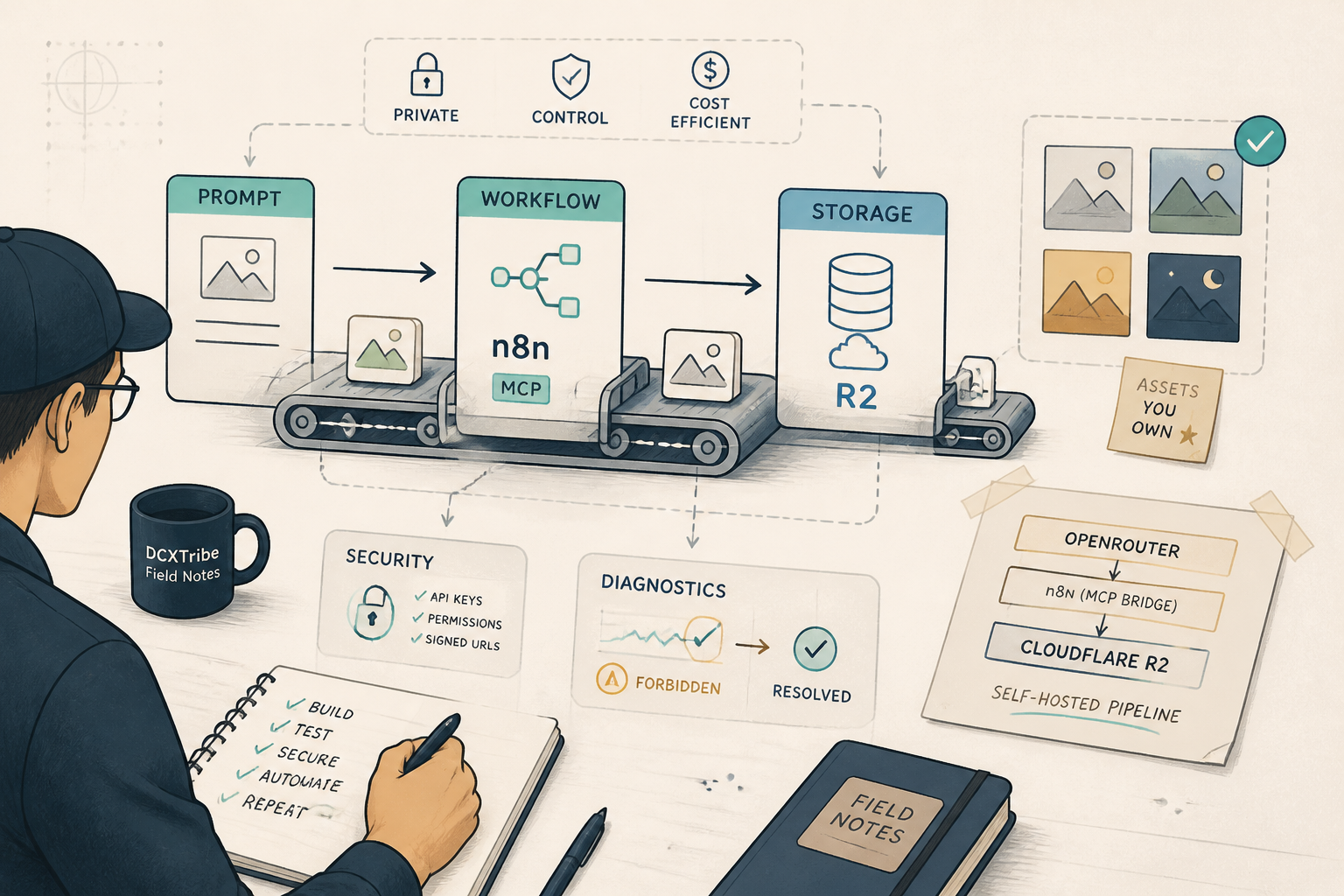
It took a full evening session — pricing research, credential troubleshooting, sandbox permission workarounds, and five archived throwaway workflows — to get one image into a private cloud bucket. But the pipeline that came out of it is worth every wrong turn.
---
What I Was Trying to Do
I wanted to generate AI images directly from Claude using OpenRouter's pay-per-use API, then store them privately in my own infrastructure — no third-party gallery, no expiring CDN links, no subscription lock-in.
Claude → n8n (MCP) → OpenRouter API → Generate Image
                                          ↓
                                    Download from provider CDN
                                          ↓
                                    Upload to Cloudflare R2 (private)
                                          ↓
                                    Return presigned URL to Claude
The goal was simple: own my generated assets, control the costs, and keep everything wired into the tools I already use daily.
---
Starting State
HiggsField MCP:       connected (existing image gen option)
n8n MCP:               connected (N8N DCXTribe)
Cloudflare account:    active, R2 not yet enabled
OpenRouter account:    active, API key available
Custom MCP for OR:     does not exist
I already had HiggsField for image generation through Claude. The question was whether OpenRouter offered a cheaper, more flexible alternative — and whether I could self-host the integration.
---
What Actually Happened
Phase 1: The Pricing Reality Check
Before building anything, I needed to know if this was worth the effort. The comparison told a clear story.
For images, HiggsField Plus ($39/month) makes most image models unlimited — hard to beat at volume. But OpenRouter wins on pay-per-use for low volume: Nano Banana 2 at $0.013 per image, Seedream 4.5 at $0.04. If you generate fewer than 30 premium images a month, OpenRouter is cheaper than any subscription.
For video, the math shifts. A 5-second Kling 3.0 clip costs roughly $1.01 on OpenRouter versus $0.23 on HiggsField Plus. But Seedance 2.0 Fast at $0.37 per 5-second clip on OpenRouter beats HiggsField's $0.98. And OpenRouter carries models HiggsField doesn't — like Grok Imagine Video at $0.064 per clip.
The real insight: neither platform wins outright. The strategic play is a hybrid — HiggsField for daily creative work through Claude's built-in MCP, OpenRouter for batch pipelines and cost-per-unit control.
Phase 2: The MCP Problem
No OpenRouter MCP connector exists in Claude's registry. Two paths forward:
- Build a custom MCP server on Coolify (medium effort, full control)
- Use n8n as a bridge (low effort, leverages existing infrastructure)
I chose the n8n bridge. My N8N DCXTribe MCP was already connected to Claude, meaning I could build a workflow and call it directly from chat. No new infrastructure, no new attack surface.
Phase 3: Security Decisions
Before writing a single workflow node, I worked through the security model:
Risk: Open webhook endpoint → anyone burns your OpenRouter credits
Fix:  Header Auth on the webhook (X-Auth-Token)

Risk: API key in environment variable
Fix:  Same trust model as existing n8n/Supabase setup. Don't commit to git.

Risk: Data in transit
Fix:  TLS on both legs (Coolify Traefik → HTTPS, OpenRouter API → HTTPS)

Risk: Generated images on expiring CDN links
Fix:  Download and store in own infrastructure (R2)
The most important decision was storage. OpenRouter returns images as base64 or temporary CDN URLs that expire in 1-24 hours. Without a storage step, every generated image is disposable. That's the whole reason for the R2 bucket.
Phase 4: The Build — Where Things Got Messy
Credential type mismatch. My first workflow used HTTP Request nodes expecting httpBearerAuth credentials. But I'd created native openRouterApi credentials in n8n — a LangChain chat model type that doesn't work with HTTP Request nodes. The n8n MCP can create workflows but can't wire credentials to nodes programmatically. That's a manual UI step.
The real problem was not the workflow code. It was the credential assignment — always a manual click in the n8n UI.
R2 "Forbidden" error. After creating the AWS credential for R2, the first connection test failed with "Forbidden." The fix was counterintuitive: change the region from auto to us-east-1. R2 doesn't use AWS regions, but n8n's AWS SDK needs a valid region string for request signing. R2 accepts requests signed with any valid AWS region. One config field. Twenty minutes of guessing.
Wrong model name. First execution authenticated successfully but returned "No endpoints found for google/gemini-2.5-flash-preview-image." The correct model name is google/gemini-2.5-flash-image — no preview in the path. Small typo, clear error message, quick fix.
S3 credential type confusion. The n8n S3 node expects an s3 type credential, not the generic aws type I originally wired. Rebuilt the upload node with the correct credential type. The n8n MCP auto-assigned the S3 credential — one less manual step.
Environment variable sandbox block. The presigned URL generator needed R2 access keys to sign URLs. I stored them as environment variables (R2_ACCESS_KEY_ID, R2_SECRET_ACCESS_KEY) and used n8n's Code node to read them. Blocked. n8n's Code node runs in a sandboxed task runner that doesn't inherit host environment variables — even with N8N_BLOCK_ENV_ACCESS_IN_NODE=false.
The fix: switch from the Code node to the Execute Command node, which runs directly on the host and has full process.env access. Different execution context, different permissions.
Phase 5: Verification
Execution #69: OpenRouter credential ✅ → Image generated ✅ → base64 returned ✅
Execution #73: Full pipeline ✅ → Image uploaded to R2 ✅ → File confirmed in bucket ✅
Presigned URL: Generated ✅ → 24-hour expiry ✅ → Image viewable in browser ✅
Total execution time for the full pipeline: ~17 seconds (generation + extraction + upload).
---
Working Chain
Claude → n8n webhook (POST with auth header)
           → HTTP Request to OpenRouter (Gemini 2.5 Flash Image)
             → Code node extracts base64 → converts to binary PNG
               → S3 node uploads to R2 (dcxtribe-generations bucket)
                 → Webhook response returns confirmation + filename
For viewing stored images:
n8n webhook (POST with filename)
  → Execute Command node reads R2 credentials from process.env
    → Signs S3v4 presigned URL (24-hour expiry)
      → Returns clickable temporary link
---
Troubleshooting Checklist
[ ] n8n AWS credential region set to us-east-1 (not auto)
[ ] Custom S3 endpoint: https://<ACCOUNT-ID>.r2.cloudflarestorage.com
[ ] No trailing slash on the endpoint URL
[ ] R2 API token scoped to specific bucket (not all buckets)
[ ] R2 API token has Object Read & Write permission
[ ] OpenRouter model name exact (check openrouter.ai/models)
[ ] Webhook has Header Auth credential assigned
[ ] OpenRouter credential assigned to HTTP Request node (manual UI step)
[ ] For env vars in n8n: use Execute Command node, not Code node
[ ] OpenRouter account spending limit set as safety net
---
What I Learned
1. n8n is a legitimate MCP bridge
The n8n MCP connection to Claude is underrated. Any API that n8n can call becomes a Claude-accessible tool — no custom MCP server needed. For solo builders, this eliminates an entire infrastructure layer.
2. Credential wiring is the manual tax
The n8n MCP can create workflows, validate them, and deploy them programmatically. But it cannot assign credentials to nodes. That single manual step in the UI is the bottleneck in every build session. Worth knowing before you plan a fully automated deployment.
3. Storage is the real decision, not the model
Choosing between OpenRouter and HiggsField for generation is a pricing exercise. The harder, more important decision is where the generated files live. Provider CDN links expire. Without your own storage layer, every generation is temporary. R2's zero egress pricing and private-by-default buckets made it the obvious pick.
4. n8n's Code node sandbox is stricter than you expect
Even with N8N_BLOCK_ENV_ACCESS_IN_NODE=false, the Code node's task runner doesn't inherit process.env. The Execute Command node does. Different execution contexts, different permission models. This distinction isn't well documented.
5. Security scoping matters even for personal infra
I started with an R2 token scoped to all buckets, then narrowed it to dcxtribe-generations only. If the credential leaks from n8n, the blast radius is one bucket instead of the entire Cloudflare account. Takes 60 seconds. Do it first, not later.
---
The Numbers
Infrastructure cost:     $0 (R2 free tier: 10GB, zero egress)
Per-image cost:          $0.013–$0.08 depending on model (pay-per-use)
Pipeline latency:        ~17 seconds end-to-end
Workflows kept:          2 (generation + presigned URL)
Workflows archived:      5 (throwaway scaffolding from the build)
Build session duration:  ~5 hours across two sittings
---
Try This Next
If you already have n8n and a Cloudflare account, you can replicate this in under an hour. The hardest part is the R2 credential setup in n8n — remember us-east-1 as the region and use the Execute Command node for anything that needs environment variables.
The pipeline works for any OpenRouter model — images today, video tomorrow. The storage layer is the same regardless.
---
*All views are my own. This field note is shared for learning and experimentation.*