
OAuth, Localhost, and Tool Loading
I wanted to give Hermes one small but practical capability:
Play music through Spotify.
Not as a polished demo. Not as a perfect tutorial. Just a real test from my own setup.
The final ask was simple:
play a song by coldplay
Eventually, Hermes found Coldplay, detected my MacBook as a Spotify device, transferred playback, and started the song.
But the journey there was not one clean command.
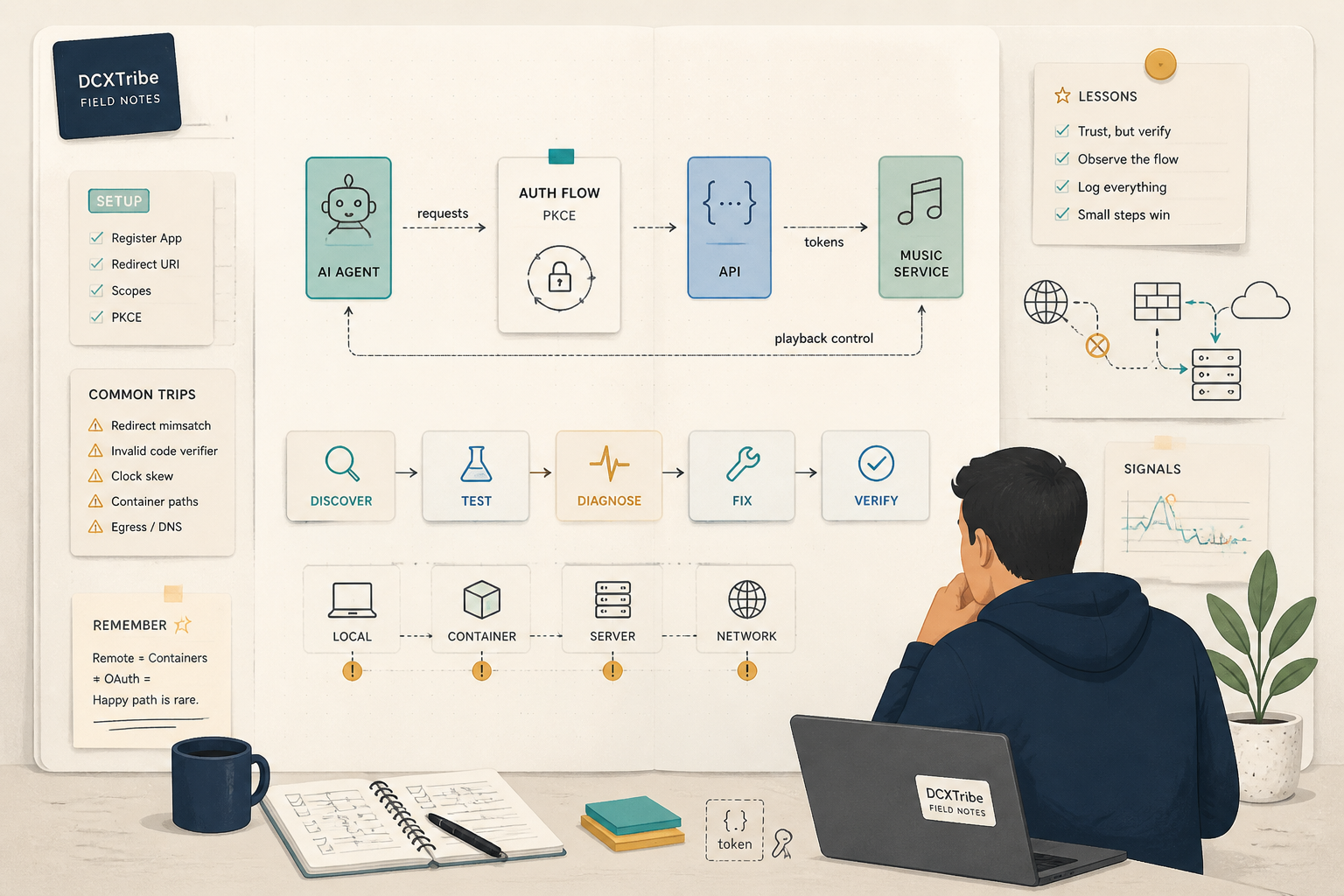
It involved OAuth, PKCE, a failed localhost callback, the wrong auth file location, the wrong JSON structure, a disabled Spotify tool, and finally a direct Spotify API fallback.
This is the field note.
---
What I Was Trying to Do
The objective was straightforward:
Hermes should be able to control Spotify from a chat interface.
In practical terms, I wanted to ask Hermes things like:
- Play a song by Coldplay
- Skip this track
- What is playing now?
- Create a playlist
- Search for lo-fi beats
For me, Spotify was a low-risk but useful integration test.
If Hermes can authenticate, store tokens, load tools, detect devices, and take action through Spotify, the same troubleshooting pattern will matter later for other integrations.
Music is not the main point.
The point is learning how an AI agent becomes useful by connecting to real tools.
---
Starting State
The session started with a simple progress check:
can you check the spotify setup progress
Hermes found the Spotify skill, but authentication was not complete.
The key output was:
spotify: logged out
There was also no existing auth file at the first checked path:
ls /opt/data/home/.hermes/auth.json
Output:
No such file or directory
No spotify key found
So the starting state was:
Hermes: running
Spotify skill: present
Spotify authentication: missing
Spotify playback: not working
Hermes then confirmed that Spotify setup required a Spotify Developer app with this redirect URI:
http://127.0.0.1:43827/spotify/callback
That redirect URI became the first major learning point.
---
The Expected Flow
The normal Spotify OAuth flow should have looked like this:
1. Create or use a Spotify Developer app
2. Add the redirect URI
3. Run Hermes Spotify login
4. Hermes starts a local callback server
5. Browser opens the Spotify authorization page
6. I click “Agree”
7. Spotify redirects to the callback URL
8. Hermes receives the code
9. Hermes exchanges the code for tokens
10. Hermes saves the auth state
11. Hermes reports: spotify: logged in
12. Hermes can control Spotify
The command pattern was:
/opt/hermes/.venv/bin/hermes auth spotify --client-id YOUR_SPOTIFY_CLIENT_ID
In theory, simple.
In practice, the browser and Hermes were not running on the same machine.
---
What Actually Happened
Failure 1: The Callback Came From an Old Flow
I first pasted a Spotify callback URL directly into the chat.
It looked like this:
http://127.0.0.1:43827/spotify/callback?code=REDACTED&state=REDACTED
Hermes correctly identified that I had completed authorization in the browser.
But there was a problem.
The local server that should have exchanged the code for tokens was no longer running.
So Hermes had to start a fresh auth flow.
It found the Spotify client ID in the environment file, but that value should not be published. In this article, I’ll refer to it as:
YOUR_SPOTIFY_CLIENT_ID
Hermes then started the Spotify PKCE login flow again.
---
Failure 2: `127.0.0.1` Pointed to the Wrong Machine
Hermes generated an authorization URL and waited for Spotify to redirect back to:
http://127.0.0.1:43827/spotify/callback
But Hermes was running on a remote server.
My browser was running on my local machine.
That means:
127.0.0.1 from my browser = my laptop
127.0.0.1 from Hermes = the remote server
So when Spotify redirected to 127.0.0.1, the browser tried to reach my own machine, not the Hermes server.
The callback server on the remote Hermes machine never received the code.
There were some noisy process messages in the log:
Background process started
status: killed
exit code 143
tcsetattr: Inappropriate ioctl for device
But that was not the real problem.
The real problem was network topology.
The browser could not reach the callback server because localhost was local to the wrong machine.
---
The Workaround: Manual PKCE Callback Capture
Hermes switched to a manual PKCE approach.
The new process was:
1. Generate a Spotify authorization URL
2. Open the URL manually in my browser
3. Click “Agree”
4. Let the redirect to 127.0.0.1 fail
5. Copy the full failed callback URL from the browser address bar
6. Paste it back into Hermes
7. Hermes verifies the state
8. Hermes exchanges the code for tokens
The important validation was:
State matches!
That meant the callback URL belonged to the same auth flow that Hermes had generated.
Then token exchange succeeded:
Token exchange successful!
At this point, the OAuth part worked.
But Hermes still did not recognize Spotify as logged in.
---
Failure 3: Tokens Existed, But Hermes Still Showed Logged Out
After token exchange, Hermes saved the token file to:
/opt/data/home/.hermes/auth.json
Then it checked Spotify status.
The result was still:
spotify: logged out
That was a useful clue.
It meant the issue was no longer Spotify authorization.
The issue was Hermes auth storage.
Hermes had tokens, but not in the place or structure that the Spotify runtime expected.
---
The Auth Path Issue
Hermes initially checked and wrote auth state around:
/opt/data/home/.hermes/auth.json
Then it found that the actual HERMES_HOME was:
/opt/data
Code inspection showed this pattern:
return get_hermes_home() / "auth.json"
So the expected auth file was:
/opt/data/auth.json
Not:
/opt/data/home/.hermes/auth.json
And not:
/opt/data/.hermes/auth.json
This is a classic container lesson.
Do not assume the home directory. Check what the application resolves as home.
---
The Auth JSON Structure Issue
The first auth state looked conceptually like this:
{
  "spotify": {
    "access_token": "REDACTED",
    "refresh_token": "REDACTED",
    "expires_at": 3600,
    "scope": "playlist-read-private playlist-read-collaborative user-modify-playback-state"
  }
}
Hermes did not accept that structure.
The corrected structure needed Spotify under:
providers.spotify
It also needed extra fields such as:
client_id
redirect_uri
token_type
auth_type
granted_scope
The corrected conceptual structure was:
{
  "providers": {
    "spotify": {
      "access_token": "REDACTED",
      "refresh_token": "REDACTED",
      "token_type": "Bearer",
      "expires_at": 1780212488,
      "granted_scope": "playlist-read-private playlist-read-collaborative user-modify-playback-state user-read-playback-state user-read-currently-playing",
      "client_id": "YOUR_SPOTIFY_CLIENT_ID",
      "redirect_uri": "http://127.0.0.1:43827/spotify/callback",
      "auth_type": "oauth_pkce"
    }
  }
}
There was one more important correction.
The first expires_at value was:
3600
That is a duration, not an absolute expiry timestamp.
Hermes expected an absolute timestamp.
Once the path, structure, and expiry format were corrected, Spotify status finally showed:
spotify: logged in
auth_type: oauth_pkce
redirect_uri: http://127.0.0.1:43827/spotify/callback
That was the first proper milestone.
---
Failure 4: Logged In, But Spotify Tools Were Disabled
After authentication worked, I tested the real outcome:
play a song by coldplay
The first attempt failed because the assistant tried an invalid tools command:
hermes tools: error: argument tools_action: invalid choice: 'invoke'
Then Hermes checked the tool status and found:
✗ disabled spotify 🎵 Spotify
So authentication was valid, but the Spotify tool was disabled.
That is an important layer separation:
Spotify OAuth logged in ≠ Spotify tool enabled
The fix was:
hermes tools enable spotify
The output confirmed:
✓ Enabled: spotify
At this point, Spotify auth was working and the Spotify tool was enabled.
But there was still one more issue.
---
Failure 5: Tool Enabled, But Not Loaded in the Current Session
After enabling Spotify, Hermes tried to use the native Spotify search tool.
The runtime returned:
Tool 'spotify_search' does not exist.
This likely happened because the Spotify tool was enabled mid-session, but the current session had not loaded the newly enabled toolset.
Instead of restarting and trying again, Hermes used the Spotify API directly with the saved token.
The direct API route worked.
Hermes found Coldplay:
Artist: Coldplay
URI: spotify:artist:REDACTED
Then it listed available devices and found my MacBook.
The MacBook was listed but not active, so Hermes transferred playback first.
The successful API responses were:
Transfer: 204 — {'status': 'ok'}
Play: 204 — {'status': 'ok'}
Then came the final result:
Coldplay is now playing on your MacBook Pro.
That was the actual success point.
Not token exchange.
Not spotify: logged in.
Not tool enablement.
The success point was playback.
---
Commands That Mattered
Check Spotify auth status
hermes auth spotify status
Expected:
spotify: logged in
Run Spotify login
/opt/hermes/.venv/bin/hermes auth spotify login --client-id YOUR_SPOTIFY_CLIENT_ID
If running remotely, expect the 127.0.0.1 redirect to fail unless you have a reachable redirect setup.
Check Hermes home
echo $HERMES_HOME
In this session, the resolved Hermes home was:
/opt/data
Check expected auth path
The relevant logic showed:
return get_hermes_home() / "auth.json"
So the expected auth file was:
/opt/data/auth.json
Enable Spotify tools
hermes tools enable spotify
Expected:
✓ Enabled: spotify
Run a real playback test
play a song by coldplay
This tests the full chain:
auth → tool access → Spotify API → device discovery → device transfer → playback
---
Working Chain
The final working chain looked like this:
User message
→ Hermes
→ Spotify auth provider state in /opt/data/auth.json
→ Spotify Web API
→ Spotify device discovery
→ Transfer playback to MacBook
→ Start Coldplay playback
There were several levels of success:
OAuth token exchange successful
Spotify auth recognized
Spotify tool enabled
Spotify API callable
Spotify device found
Playback started
Only the last one proved the integration worked as a user experience.
---
Troubleshooting Checklist
If I need to repeat this setup, this is the checklist I would use:
[ ] Is the Spotify Developer app created?
[ ] Is the redirect URI added exactly as required?
[ ] Is the Spotify client ID available to Hermes?
[ ] Is the browser running on the same machine as Hermes?
[ ] If not, am I using manual PKCE callback capture?
[ ] Did the callback URL include both code and state?
[ ] Did the state match the generated auth flow?
[ ] Did token exchange succeed?
[ ] Is HERMES_HOME what I think it is?
[ ] Is auth.json stored at the expected path?
[ ] Is Spotify stored under providers.spotify?
[ ] Does expires_at use an absolute timestamp?
[ ] Does the Spotify auth state include client_id and redirect_uri?
[ ] Does hermes auth spotify status show logged in?
[ ] Is the Spotify tool enabled?
[ ] Was the session restarted after enabling the tool?
[ ] Is there an available Spotify device?
[ ] Is playback transferred to the right device?
[ ] Did I test the real user outcome?
---
Lessons Learned
1. Localhost Depends on Where the Browser Runs
127.0.0.1 is not universal.
In this case:
127.0.0.1 in my browser ≠ 127.0.0.1 on the Hermes server
That broke the automatic OAuth callback.
---
2. Manual PKCE Is a Useful Fallback
When the local callback server cannot receive the redirect, the manual approach works:
Open URL
→ Approve
→ Copy failed callback URL
→ Paste it back
→ Exchange code
It is not elegant, but it is effective.
---
3. Token Exchange Success Is Not Application Success
Hermes successfully exchanged the Spotify code for tokens, but still showed:
spotify: logged out
The problem was not OAuth anymore.
It was storage path and format.
---
4. Auth File Structure Matters
Hermes needed:
providers.spotify
Not:
spotify
That small nesting difference blocked the whole integration.
---
5. Expiry Format Matters
An expiry duration like:
3600
is not the same as an absolute expiry timestamp.
OAuth details are unforgiving.
---
6. Authentication and Tool Enablement Are Separate Layers
Spotify can be logged in while the Spotify tool remains disabled.
Both must be true:
spotify: logged in
spotify tool: enabled
---
7. A Tool Enabled Mid-Session May Not Be Loaded Yet
After enabling Spotify, the current session still did not have the native tool available.
A restart or fresh session would likely load it properly.
Hermes worked around it by calling the Spotify API directly.
---
8. The Real Test Is the User Outcome
The only test that mattered was:
Can Hermes play music?
Not:
Did token exchange work?
Did the file save?
Did the status show logged in?
Those are checkpoints.
Playback is the outcome.
---
Final Reflection
This was a small integration, but it exposed many layers of AI-agent infrastructure.
OAuth was one layer.
Remote server topology was another.
Auth file location was another.
JSON structure was another.
Tool enablement was another.
Session loading was another.
Spotify device state was another.
That is the real lesson.
AI agents do not become useful just because they can chat. They become useful when they can connect to tools, understand state, recover from friction, and complete real actions.
This is why field notes matter.
A clean tutorial might say:
Run Spotify auth and enable the tool.
But the real journey was:
Logged out
Wrong callback path
Remote localhost issue
Manual PKCE
Token saved in wrong place
Wrong auth structure
Wrong expiry format
Spotify logged in
Tool disabled
Tool enabled
Tool not loaded
Direct API fallback
Device transfer
Coldplay played
That is the useful version.
Because that is what actually happened.
All views are my own. This field note is shared for learning and experimentation.