
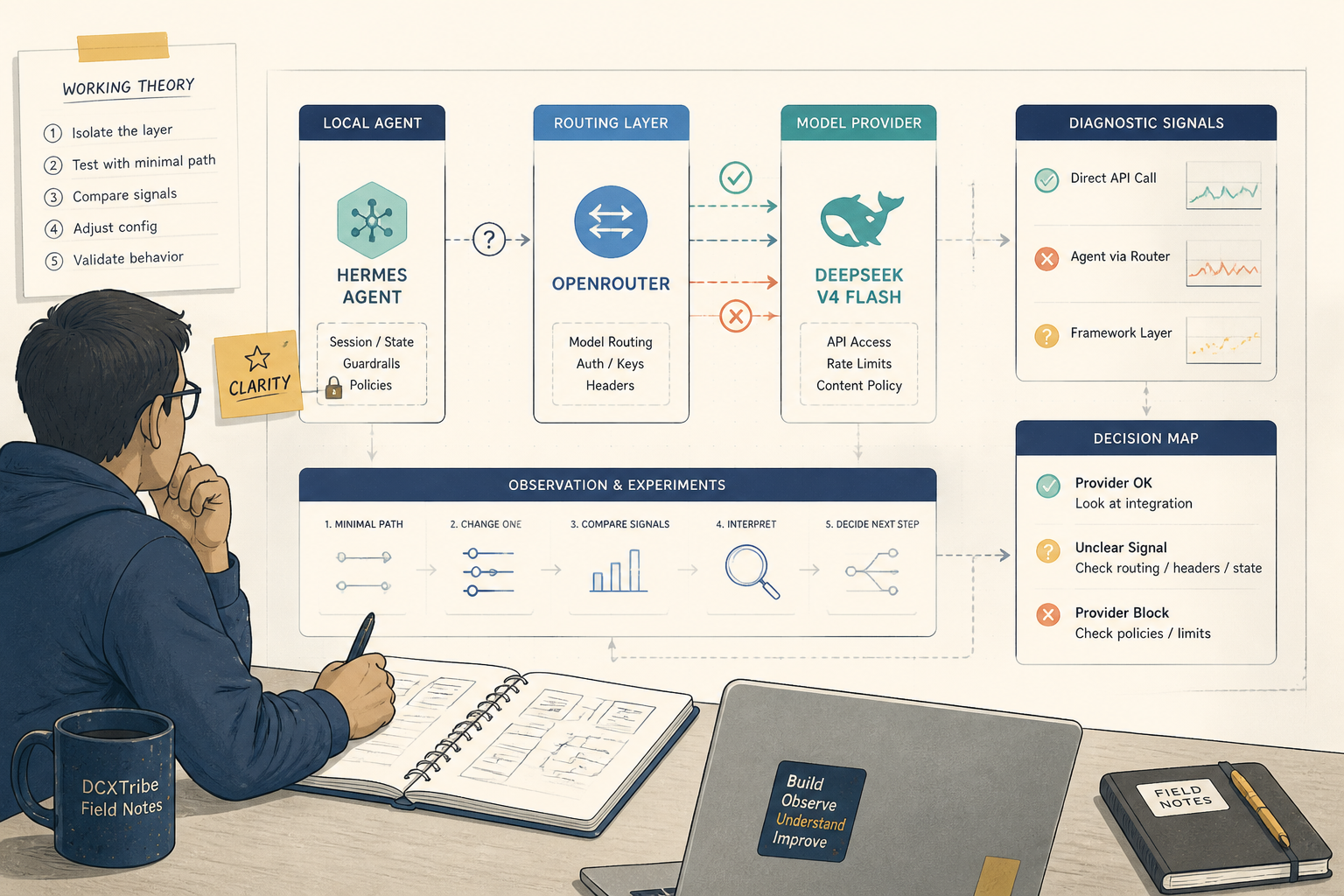
After struggling to connect Hermes to ILMU, I decided to try a cleaner path:
Hermes
→ OpenRouter
→ DeepSeek V4 Flash
This made sense because OpenRouter is designed to expose many models through an OpenAI-compatible API.
It also gives visibility into:
which model was called
which provider served the request
what the cost was
whether guardrails blocked the request
whether privacy settings affected routing
That visibility helped a lot.
But even with OpenRouter, the journey was not fully smooth.
---
Why I Switched to OpenRouter
The ILMU issue gave me this error:
Missing Authentication header
That made it hard to know whether the problem was:
Hermes
ILMU
the API key
the model name
the provider route
OpenRouter gave me a better testing structure.
I could test the model directly before involving Hermes.
That was the main reason I switched.
The new target setup was:
Coolify
→ Hermes
→ OpenRouter
→ DeepSeek V4 Flash
---
What I Wanted to Achieve
The bigger picture was still the same.
I wanted Hermes to become an agent backend that I could later use with:
Open WebUI
MCP tools
Todoist
Perplexity
Higgsfield
OpenClaw
But first I needed one thing to work:
Hermes must call the model successfully.
So I moved from ILMU to OpenRouter because it gave me a more visible and testable route.
---
Coolify Shared Variables for OpenRouter
I created these shared variables in Coolify:
HERMES_API_SERVER_KEY=your_hermes_access_key
OPENROUTER_API_KEY=your_openrouter_key
The rule is:
HERMES_API_SERVER_KEY
= used by me to call Hermes

OPENROUTER_API_KEY
= used by Hermes to call OpenRouter
Both should have:
Is Multiline? unchecked
I also learned again that variable names are case-sensitive.
This matters:
OPENROUTER_API_KEY
is not the same as:
openrouter_api_key
---
The OpenRouter Hermes Compose
The Hermes compose moved toward this structure:
version: '3.9'

services:
  hermes:
    image: 'nousresearch/hermes-agent:latest'
    restart: unless-stopped
    command:
      - gateway
      - run

    ports:
      - '8642:8642'

    environment:
      HERMES_UID: '10000'
      HERMES_GID: '10000'

      API_SERVER_ENABLED: 'true'
      API_SERVER_HOST: '0.0.0.0'
      API_SERVER_PORT: '8642'
      API_SERVER_KEY: '{{environment.HERMES_API_SERVER_KEY}}'
      API_SERVER_MODEL_NAME: 'hermes-agent'

      OPENAI_API_KEY: '{{environment.OPENROUTER_API_KEY}}'
      OPENROUTER_API_KEY: '{{environment.OPENROUTER_API_KEY}}'

      OPENAI_BASE_URL: 'https://openrouter.ai/api/v1'
      OPENAI_API_BASE: 'https://openrouter.ai/api/v1'

      HERMES_INFERENCE_PROVIDER: 'openrouter'
      HERMES_MODEL: 'deepseek/deepseek-v4-flash'
      HERMES_INFERENCE_MODEL: 'deepseek/deepseek-v4-flash'

    volumes:
      - 'hermes_data:/opt/data'

volumes:
  hermes_data:
The key idea was:
I call Hermes using hermes-agent.
Hermes should call OpenRouter using DeepSeek V4 Flash.
So even though my request says:
"model": "hermes-agent"
the intended backend model is:
deepseek/deepseek-v4-flash
---
What Worked
Several things worked well.
Hermes still worked:
/health returned OK
/v1/models returned hermes-agent
HERMES_API_SERVER_KEY worked
OpenRouter also worked directly.
I tested DeepSeek V4 Flash directly through OpenRouter and got:
HTTP_CODE=200
model: deepseek/deepseek-v4-flash
provider: DeepSeek
That was a major breakthrough.
It proved:
OpenRouter key works
DeepSeek V4 Flash is available
DeepSeek can respond directly
Then I tested a tool-style request to DeepSeek through OpenRouter.
That also worked.
This was important because Hermes is not a simple chatbot. Hermes sends a much larger agent-style request with context, skills, and tools.
The tool-style DeepSeek test returned:
DeepSeek tool test successful.
That proved:
DeepSeek simple chat works
DeepSeek tool-style request works
OpenRouter key works
Privacy and guardrails can be configured correctly
So the external provider path was working.
---
The OpenRouter Mistake I Made
Before getting the direct DeepSeek call working, I hit this error:
No endpoints available matching your guardrail restrictions and data policy
At first, I thought Hermes was broken.
But the real problem was my OpenRouter settings.
I had configured:
Guardrail:
Only allow DeepSeek models
But my privacy setting was also disallowing paid endpoints that may train on request data.
So the final result was:
DeepSeek was allowed by model guardrail,
but blocked by privacy/data policy.
That was a very useful lesson.
A model can be visible in OpenRouter but still unusable if privacy, provider, guardrail, or data policies block all available endpoints.
The better setup is:
Use a dedicated OpenRouter key for Hermes
Set a small spend limit
Allow DeepSeek V4 Flash and Pro
Start with workable privacy settings
Tighten policies gradually
Do not over-tighten everything on day one.
---
Testing OpenRouter Directly
The direct DeepSeek test looked like this:
curl -sS -i --connect-timeout 10 --max-time 60 \
  -H "Authorization: Bearer YOUR_OPENROUTER_API_KEY" \
  -H "Content-Type: application/json" \
  --data-raw '{"model":"deepseek/deepseek-v4-flash","messages":[{"role":"user","content":"Reply with exactly: DeepSeek direct test successful."}],"stream":false}' \
  https://openrouter.ai/api/v1/chat/completions \
  -w '\nHTTP_CODE=%{http_code}\nTOTAL_TIME=%{time_total}\n'
The successful response showed:
HTTP_CODE=200
provider: DeepSeek
model: deepseek/deepseek-v4-flash
This helped me confirm that the OpenRouter side was working.
---
Testing Tool-Style DeepSeek Calls
Since Hermes is more agent-like, I also tested whether DeepSeek could handle tool-style requests.
The command included a dummy tool.
The result worked:
HTTP_CODE=200
DeepSeek tool test successful.
This was important because it proved the model could handle more than a basic chat request.
At that point, I knew:
OpenRouter works.
DeepSeek works.
Tool-style requests work.
So if Hermes still failed, the issue was likely inside Hermes.
---
What Still Did Not Work
Here is the honest part.
Even though direct OpenRouter worked, Hermes still failed when trying to complete an agent chat.
The Hermes error remained:
502 Bad Gateway
No endpoints available matching your guardrail restrictions and data policy
This was confusing because:
Direct curl → OpenRouter → DeepSeek worked
Direct curl with tools → OpenRouter → DeepSeek worked
Hermes → OpenRouter → DeepSeek did not work
That means the unresolved issue is likely inside the Hermes layer.
Possibilities include:
Hermes internal model routing
old session persistence
persistent volume state
provider fallback behaviour
different request parameters
a larger Hermes agent payload
One clue was that Hermes kept returning the same session ID:
api-39a7d580c3e4b688
That made me suspect that Hermes may still be using an old session or cached routing state.
---
What I Tried
I tried several things:
Restarting Hermes
Redeploying Hermes
Adding HERMES_INFERENCE_PROVIDER=openrouter
Confirming OPENROUTER_API_KEY exists inside the container
Confirming HERMES_MODEL is deepseek/deepseek-v4-flash
Confirming direct OpenRouter DeepSeek works
Testing DeepSeek tool-style calls
Creating a Hermes config.yaml manually
Considering a fresh Hermes volume
The fresh volume idea is still probably the next clean test:
volumes:
  - 'hermes_data_v2:/opt/data'

volumes:
  hermes_data_v2:
That would help rule out old persisted state.
But at this point, I had not yet fully resolved the Hermes-to-DeepSeek routing issue.
---
The Most Useful Troubleshooting Framework
This is the real value from the experiment.
When debugging AI infrastructure, I learned to test the chain in layers.
1. Test Hermes health
curl -i --max-time 10 http://127.0.0.1:8642/health
2. Test Hermes authentication
curl -i --max-time 10 \
  -H 'Authorization: Bearer YOUR_HERMES_API_SERVER_KEY' \
  http://127.0.0.1:8642/v1/models
3. Test OpenRouter directly
curl -sS -i --connect-timeout 10 --max-time 60 \
  -H "Authorization: Bearer YOUR_OPENROUTER_API_KEY" \
  -H "Content-Type: application/json" \
  --data-raw '{"model":"deepseek/deepseek-v4-flash","messages":[{"role":"user","content":"Reply with exactly: DeepSeek direct test successful."}],"stream":false}' \
  https://openrouter.ai/api/v1/chat/completions
4. Test OpenRouter with tools
This helps check whether the model can support more agent-like requests.
5. Test Hermes chat
curl -v --max-time 60 \
  -H 'Authorization: Bearer YOUR_HERMES_API_SERVER_KEY' \
  -H 'Content-Type: application/json' \
  --data-raw '{"model":"hermes-agent","messages":[{"role":"user","content":"Reply with exactly this sentence: Hermes DeepSeek test successful."}],"stream":false}' \
  http://127.0.0.1:8642/v1/chat/completions
The lesson:
Do not debug the whole system at once. Isolate each layer.
---
What Worked vs What Did Not
What worked:
Hermes installed on Coolify
Hermes health endpoint worked
Hermes API key worked
Hermes exposed hermes-agent
OpenRouter key worked
DeepSeek V4 Flash worked directly
DeepSeek tool-style call worked directly
What did not fully work:
Hermes agent call did not consistently route to DeepSeek V4 Flash.
So I would not call this a complete failure.
But I would also not call it complete success.
The honest status is:
Hermes is installed and running. OpenRouter and DeepSeek work directly. But Hermes-to-DeepSeek routing is still unresolved.
---
My Practical Decision
For now, I would separate the architecture like this:
OpenClaw → ILMU
Open WebUI → OpenRouter → DeepSeek
Hermes → continue testing as agent layer
This avoids blocking everything on one unresolved integration.
The next practical interface should probably be:
Open WebUI
→ OpenRouter
→ DeepSeek V4 Flash
for normal mobile/chat usage.
Then continue testing:
Open WebUI
→ Hermes
→ OpenRouter
for agent mode.
---
Final Reflection
This second attempt was better than the first because OpenRouter gave me more visibility.
But it also reminded me that AI infrastructure has many hidden layers.
The model can work.
The key can work.
The provider can work.
But the agent framework can still fail because the request shape, session state, or routing logic is different.
That is the real learning.
In AI infrastructure, success is not one big switch. It is a chain of small confirmations.
This journey did not end with a perfect working Hermes setup.
But it did give me a clearer troubleshooting framework.
And that may be the more important win.