
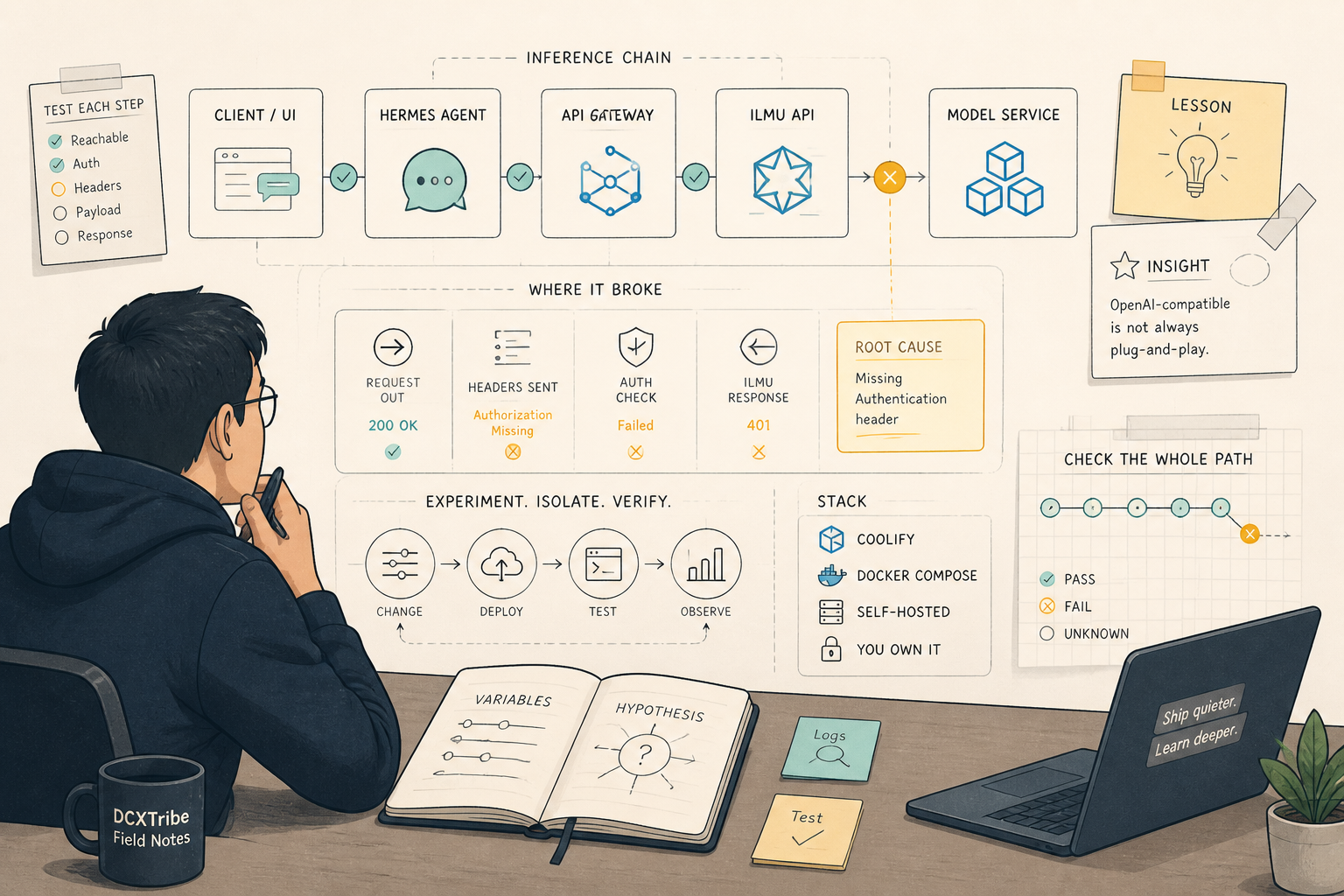
I started this experiment with a simple idea:
Since I already had ILMU working in OpenClaw, maybe I could also use the same ILMU API key with Hermes.
On paper, it sounded logical.
My intended setup was:
Coolify
→ Hermes
→ ILMU API
→ ilmu-nemo-nano / nemo-super
I thought this would be a straightforward configuration exercise.
It was not.
But the learning was valuable.
---
Why I Tried ILMU First
I already had an ILMU key from my OpenClaw setup. Since OpenClaw was part of my AI experimentation stack, it felt natural to try ILMU as the backend model provider for Hermes as well.
The logic was simple:
If OpenClaw can use ILMU,
maybe Hermes can use ILMU too.
So I created a Hermes service in Coolify using Docker Compose.
My Hermes container started.
The health check worked.
The /v1/models endpoint worked.
At that point, I thought I was close.
But I was only close to getting Hermes running — not close to getting Hermes + ILMU working.
That distinction became important.
---
My Starting Point
At the time, my stack already included:
Coolify
Traefik
OpenClaw
n8n
Postiz
Hermes
ILMU
I wanted Hermes to become another agent layer in the stack.
The bigger idea was:
Mobile / browser interface
→ Hermes
→ model provider
→ future tools like Todoist, Perplexity, Higgsfield, MCP
But before getting to the exciting part, I first needed to get the basic model connection working.
---
Creating Hermes as a Coolify Resource
In Coolify, I created Hermes as a Docker Compose resource:
Coolify
→ Project
→ New Resource
→ Docker Compose
I used Docker Compose because Hermes needs more than just a simple container image.
It needs:
image
command
port
environment variables
API keys
persistent storage
model settings
The image that worked for me was:
image: 'nousresearch/hermes-agent:latest'
The command was:
command:
  - gateway
  - run
The Hermes API server runs on:
8642
So the port mapping was:
ports:
  - '8642:8642'
---
The First Compose Direction
The early compose structure looked roughly like this:
version: '3.9'

services:
  hermes:
    image: 'nousresearch/hermes-agent:latest'
    restart: unless-stopped
    command:
      - gateway
      - run

    ports:
      - '8642:8642'

    environment:
      HERMES_UID: '10000'
      HERMES_GID: '10000'

      API_SERVER_ENABLED: 'true'
      API_SERVER_HOST: '0.0.0.0'
      API_SERVER_PORT: '8642'
      API_SERVER_KEY: '{{environment.HERMES_API_SERVER_KEY}}'
      API_SERVER_MODEL_NAME: 'hermes-agent'

      OPENAI_API_KEY: '{{environment.ILMUNANO_API_KEY}}'
      ILMU_API_KEY: '{{environment.ILMUNANO_API_KEY}}'
      ILMUNANO_API_KEY: '{{environment.ILMUNANO_API_KEY}}'

      OPENAI_BASE_URL: 'https://api.ilmu.ai/v1'
      OPENAI_API_BASE: 'https://api.ilmu.ai/v1'

      HERMES_MODEL: 'ilmu-nemo-nano'
      HERMES_INFERENCE_MODEL: 'ilmu-nemo-nano'

    volumes:
      - 'hermes_data:/opt/data'

volumes:
  hermes_data:
The intention was clear:
I call Hermes using HERMES_API_SERVER_KEY.
Hermes calls ILMU using ILMUNANO_API_KEY.
---
Shared Variables in Coolify
I created these shared variables in Coolify:
HERMES_API_SERVER_KEY=your_hermes_server_key
ILMUNANO_API_KEY=your_ilmu_key
I learned quickly that variable names are case-sensitive.
This matters:
ILMUNANO_API_KEY
is not the same as:
ilmunano_api_key
One letter or casing mismatch can break the whole setup.
I also learned not to create API server keys with special characters like:
& # $ ? !
Those characters can confuse shell commands or Docker Compose.
For generated server keys, a safer format is:
openssl rand -hex 32
That gives a clean random key that is easier to use across shell, YAML, and Docker.
---
What Worked
The Hermes installation itself worked.
I was able to confirm:
Hermes container started
Hermes gateway started
/health returned OK
/v1/models returned hermes-agent
Hermes API server key worked
The health check worked:
curl -i --max-time 10 http://127.0.0.1:8642/health
A successful response looked like:
HTTP/1.1 200 OK
{"status": "ok", "platform": "hermes-agent"}
Then /v1/models also worked:
curl -i --max-time 10 \
  -H 'Authorization: Bearer YOUR_HERMES_API_SERVER_KEY' \
  http://127.0.0.1:8642/v1/models
That returned hermes-agent.
So at this point, I knew:
Coolify was working
Hermes container was working
Hermes API server was working
HERMES_API_SERVER_KEY was working
This was an important distinction.
The installation worked.
The ILMU integration did not.
---
Where It Failed
The failure happened when Hermes tried to call ILMU.
The error I kept seeing was:
Missing Authentication header
This was the key clue.
It meant:
My request reached Hermes.
Hermes accepted my API key.
But when Hermes called ILMU, ILMU did not receive the authentication header.
So the failing part was not:
Me → Hermes
The failing part was:
Hermes → ILMU
That distinction helped me avoid blaming the wrong layer.
---
What I Checked
I checked whether the ILMU key was inside the Hermes container.
It was.
The environment variable existed.
The key length was present.
So this was not simply a case of “I forgot to add the API key.”
The problem seemed to be that Hermes was not passing the key to ILMU in the way ILMU expected.
I tried mapping the same key under different names:
OPENAI_API_KEY
ILMU_API_KEY
ILMUNANO_API_KEY
I also pointed Hermes to:
https://api.ilmu.ai/v1
But the chat completion call still failed.
---
The Key Confusion I Made
One of my early mistakes was confusing the different keys.
There were two different types of keys involved:
| Key | Purpose | |---|---| | HERMES_API_SERVER_KEY | Used by me to access Hermes | | ILMUNANO_API_KEY | Used by Hermes to call ILMU |
When calling Hermes, I should use:
HERMES_API_SERVER_KEY
When Hermes calls ILMU, Hermes should use:
ILMUNANO_API_KEY
At one point, I used the wrong key in the wrong place and got:
401 Unauthorized
Invalid API key
The lesson:
Not all API keys are the same. The key that protects the agent server is not the same as the key that calls the model provider.
---
The Real Learning from the ILMU Attempt
The biggest learning was this:
A key that works in one tool does not automatically work the same way in another tool.
OpenClaw may know exactly how to talk to ILMU.
Hermes may treat ILMU as a generic OpenAI-compatible endpoint.
That sounds simple, but integration depends on details:
Which header is expected?
Which model name is accepted?
Is the key scoped to certain plans?
Does the provider require a special route?
Does the tool have provider-specific logic?
So I learned not to assume:
OpenClaw → ILMU works
therefore
Hermes → ILMU works
That assumption was wrong.
---
What I Would Do Differently
If I were doing this again, I would test ILMU directly first before putting Hermes in the middle.
The better troubleshooting sequence would be:
1. Test ILMU directly with curl
2. Confirm the model responds
3. Confirm the correct model name
4. Confirm the correct auth format
5. Then configure Hermes
6. Then test Hermes → ILMU
I jumped too quickly into the full chain.
That made debugging harder.
---
My Current Conclusion on ILMU + Hermes
I did not get ILMU working reliably as the Hermes backend.
But I did learn something useful.
My current architecture view is:
OpenClaw → ILMU
Hermes → OpenRouter
At least for now.
That is not a failure.
It is a cleaner separation.
The lesson is:
Use each provider where it is stable first. Do not force every provider into every tool too early.
ILMU remains useful for my OpenClaw experimentation.
But for Hermes, I decided to switch to OpenRouter because it gave me better model visibility, easier testing, and clearer routing diagnostics.
That transition became the second part of the journey.